
Obsidian Alternatives
This post was written by the TypeTak team. Our own product is part of the comparison, so please read with that in mind. That's why we built it on official sources and cited user reviews, and worked to keep it fair to every tool. Prices and features reflect each service's official pages as of October 2026 and may change. We compare from a novelist's point of view and leave out work notes and personal knowledge management.
What is Obsidian?
Obsidian is a note-taking app that links Markdown files stored on your own computer. Notes live as plain text files in a folder called a vault. Link one note to another with [[ ]], and backlinks and the graph view show you those connections. The app is free with no account, and syncing between devices (Sync) and publishing to the web (Publish) are separate subscriptions.
It isn't built for fiction. Things like compiling a manuscript, timelines, maps, and AI come from community plugins. There's no AI in the core app.
Why writers use Obsidian
Writers use it because they want to own their files. Notes are Markdown files on your computer, so you can write offline, and your writing outlives the app. Stack up characters, places, and lore as notes and link them, and you have your own worldbuilding wiki. Whatever else you need, you pick from the plugins.
"Everything lives as markdown files on your computer."
— Vanessa Glau, writer · Substack (2022)
A common pairing is Obsidian for lore and planning, Scrivener for the manuscript. The worldbuilding wiki, research, and plot notes stay in Obsidian, while the drafting and compiling into a book happen in Scrivener.
The flip side, many say, is how much time it takes to set up. Forum threads often tell of writers who spent their time choosing plugins and polishing templates and never got to the manuscript.
"I am failing to see any value in my efforts."
— aswhite1, a novelist who drafts in Scrivener · Obsidian Forum (2026)
Below, we compare five areas side by side with TypeTak, Scrivener, and Novelcrafter: organizing lore, seeing your world at a glance, writing and compiling a manuscript, writing with AI, and files and collaboration.
1. Organizing lore
| Feature | Obsidian | TypeTak | Scrivener | Novelcrafter |
|---|---|---|---|---|
| Organize characters, places, and lore as entries | Notes | World | Documents in the Research folder | Codex |
| Set fields for each entry | Properties · Templates | Property and section slots per type | Custom metadata | Details |
| [[ links between entries | Document links | Relations | ||
| See entries of one kind as a table or cards | Bases | Node table · cards | Metadata columns in the Outliner | |
| Find and highlight names in the manuscript | Unlinked mentions | Mention highlighting | ||
| Record lore that changes over time | Progression · property start and end | Progressions | ||
| AI builds types and fields to fit your story | ||||
| Collect lore you settle in conversation |
Over a long novel, characters and lore scatter fast. All four tools collect your lore as entries with fields. What sets them apart is who builds that structure and how closely it sits next to the manuscript.
How lore is structured — Obsidian and TypeTak structure lore in much the same way. Each entry has short fields like age or faction, with longer writing like backstory or history below in Markdown. Entries of the same kind can be gathered into a table or cards and compared at a glance.
In Obsidian, one note is one entry, and the short fields go in Properties at the top of the note. Set up a skeleton for character notes with Templates, and every new character starts with the same fields and headings. Bases gathers your notes' Properties into a table, cards, or a Kanban board.
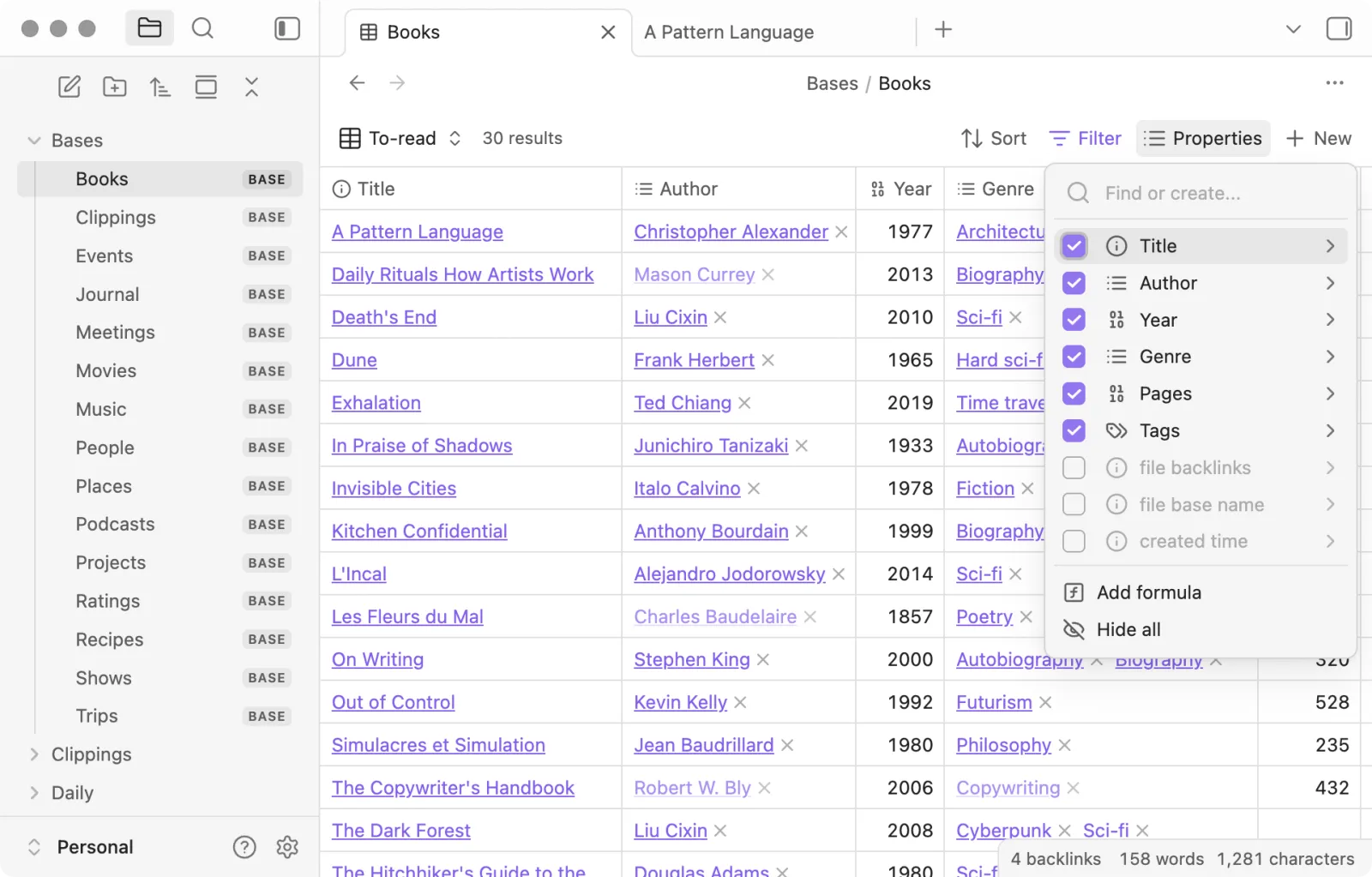
In TypeTak, node types like characters, places, and factions decide what goes into the nodes of that type. Properties for short facts and sections for longer writing are both slots of the type, so every node of a type has the same fields. Add or remove a slot later, and the change applies to every node of that type. The AI sets up the first types and slots to fit your story.
Scrivener keeps character sketches and research as documents in the Research folder of the same project as your manuscript, and adds fields through custom metadata. Novelcrafter's Codex attaches Details fields to built-in types like character, location, and object, and lets you choose for each field whether the AI sees it.
Linking lore — In Obsidian and TypeTak, typing [[ in the text links to another entry, and backlinks gather every place that mentions it. Obsidian also finds places where a name appears without a link, as unlinked mentions, which makes it easy to turn them into links later. Scrivener links documents with [[ ]] too.
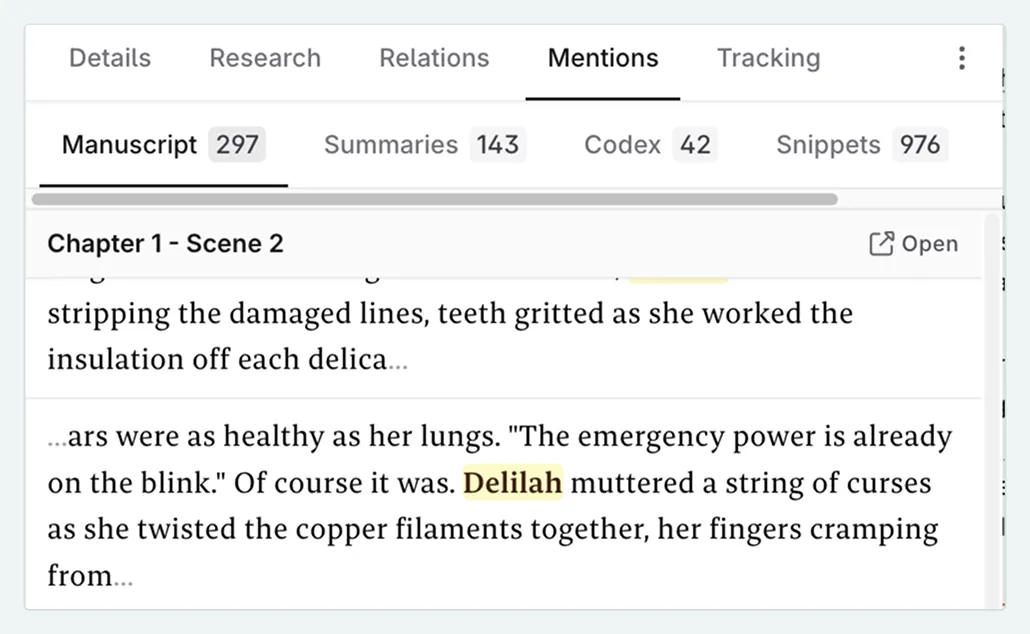
Novelcrafter is the best at finding names in the manuscript. Register a name and its aliases in the Codex, and it highlights them wherever they appear in your prose and collects the scenes they appear in under the Mentions tab.
Lore that changes — Lore that shifts as the story goes on, like a title or an allegiance, is recorded over time with TypeTak's Progression and Novelcrafter's Progressions. TypeTak builds up how a character changes in story order under each section, and short values record where they start and end. Earlier chapters' lore isn't overwritten, so changes partway through a serial don't get mixed up.
Organizing with AI — Having AI collect and organize the lore you settle in conversation is a feature only TypeTak has among the four. You tick the characters, places, and rules the agent suggests right under its reply, and what you settle while writing collects in the World backlog below the chat box; click Organize to file them into your World. How a character changes in a chapter is written down as Progression entries. You can also build and edit your World entirely by hand.
2. Seeing your world at a glance
| Feature | Obsidian | TypeTak | Scrivener | Novelcrafter |
|---|---|---|---|---|
| See how entries connect as a graph | Graph view | Relationship graph | ||
| Name relationships like faction, family, or rival | Labels on Canvas connections | Relation properties | List of relations | |
| Freeform whiteboard | Canvas | Canvas | Freeform corkboard | |
| Lay out cards in groups and order | Bases Kanban | Board | Corkboard | Plan Grid |
| Timeline | Plugin (Chronos) | A board as a timeline | ||
| Map | Bases map view · plugin (Leaflet) |
As your lore grows, you start wanting to see who's tied to whom and the order in which events happen.
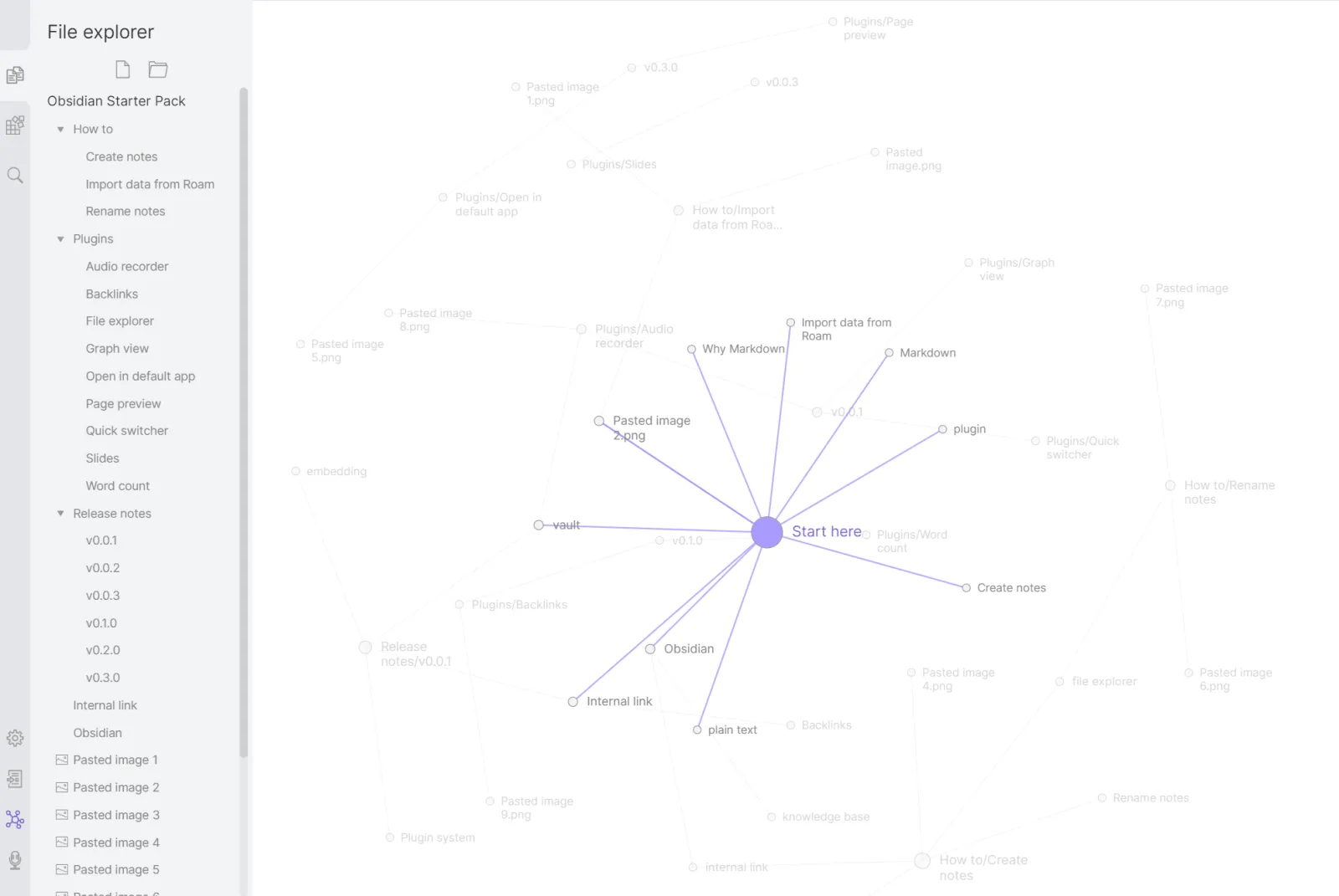
Seeing relationships — Obsidian's graph view draws notes as dots and links as lines. The more links a note receives, the bigger its dot, so the center of your story stands out. Each line stands for one link.
TypeTak's relationship graph draws the relations written in your World. Fill in a relation like faction, family, or rival on a character entry, and a line joins the two entries; click a dot to see its relations and text links in a small popup.
Novelcrafter keeps relations between Codex entries as a list, and when an entry goes to the AI, its related entries go along with it.
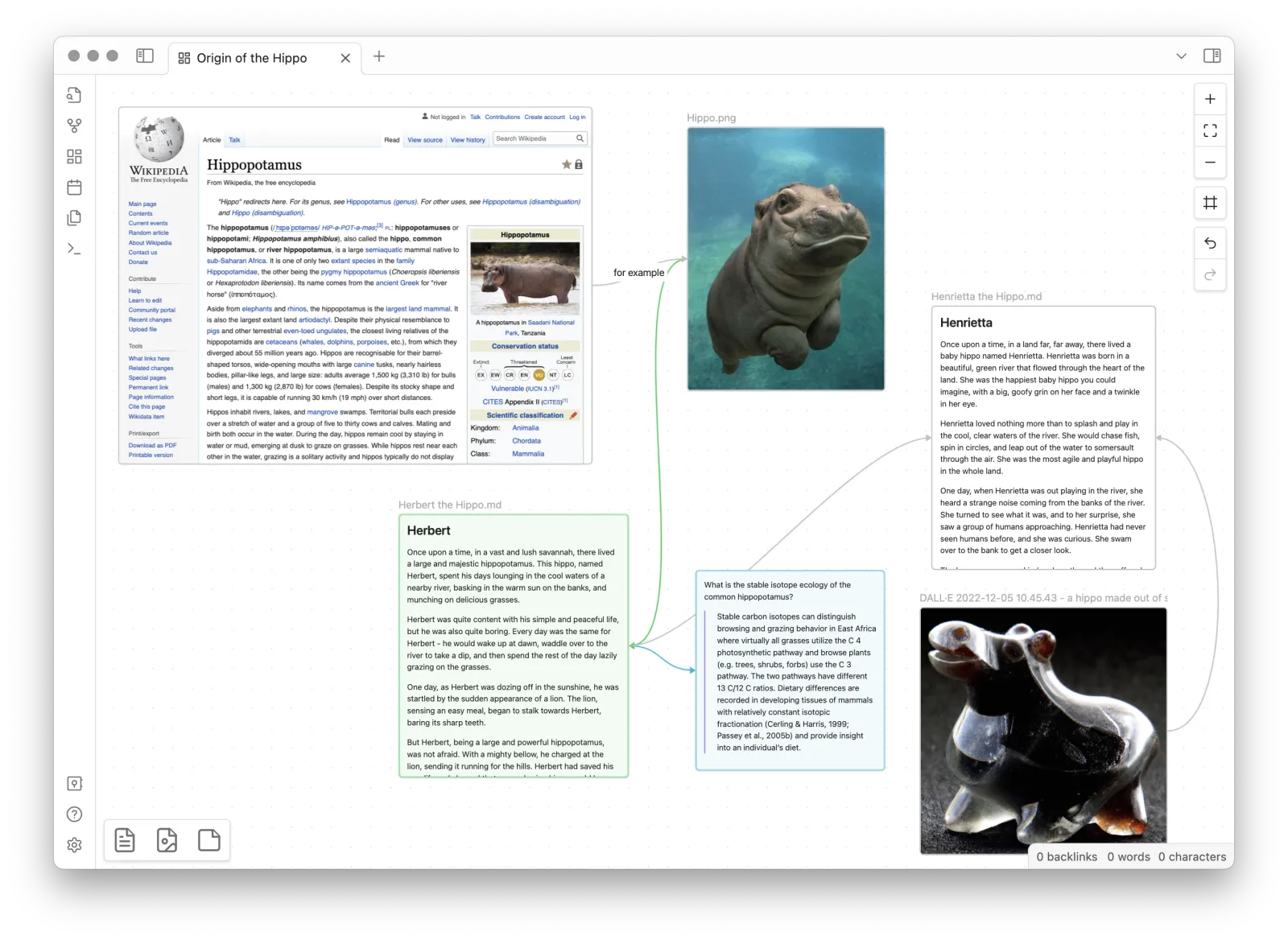
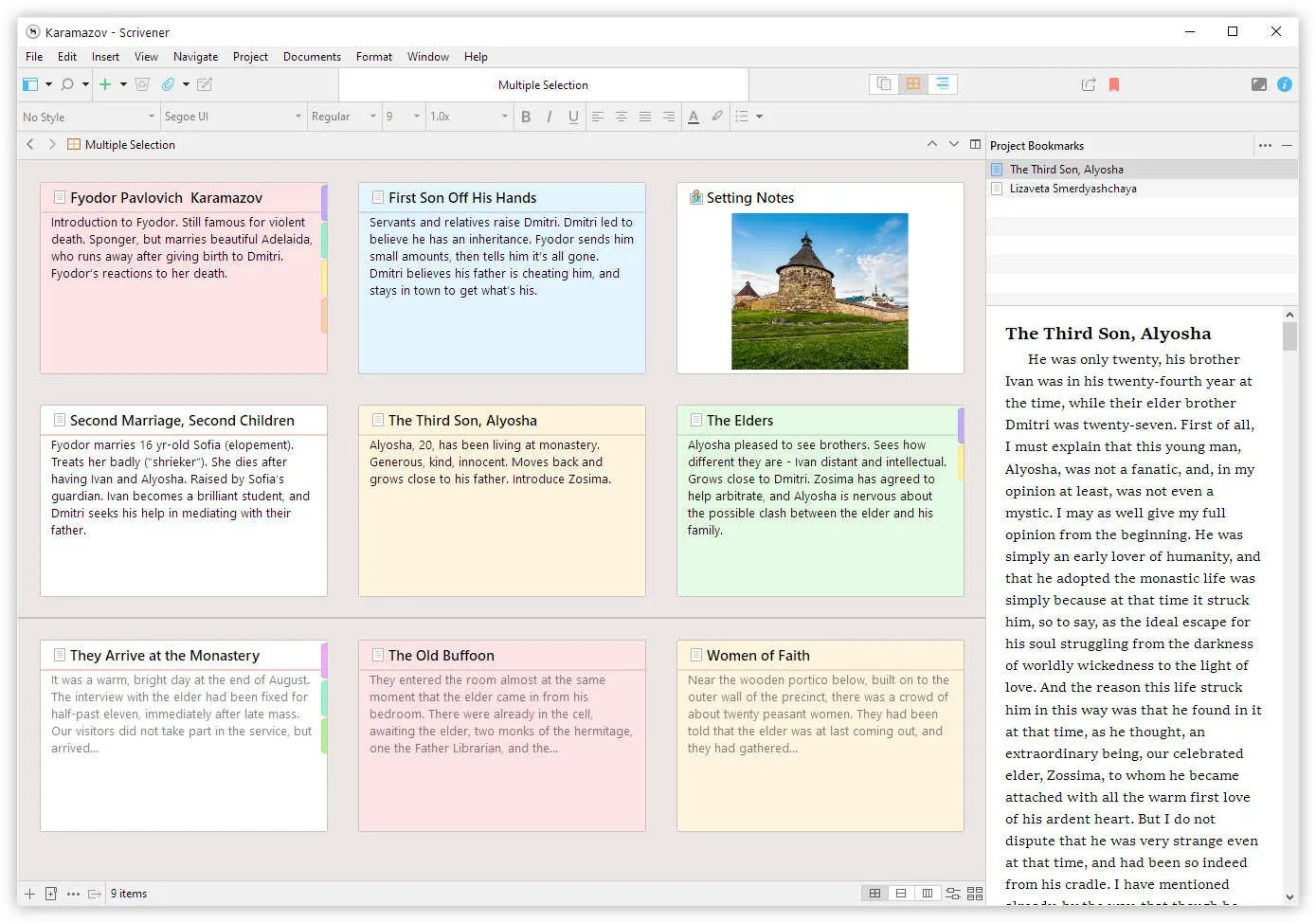
Spreading things out — If you want to lay out cards and connect them with lines, with no fixed structure, Obsidian's Canvas and TypeTak's Canvas fit. Both let you place cards and connections freely and label a connection with a word like "betrayal." Obsidian can put a note on the Canvas directly as a card.
Putting things in order — Plots and scene lists read best as cards laid out in order. Scrivener's corkboard shows your manuscript's scenes as index cards, and moving a card reorders the manuscript too. In TypeTak, you make a board like "Story" in your World to lay out events in groups and order, and build a timeline the same way. Obsidian lays out scene cards with the Bases Kanban view, and Novelcrafter with the Plan Grid.
Timelines and maps — For dedicated timelines and maps, Obsidian covers the most ground through plugins. Chronos draws events written in Markdown as a timeline, and Leaflet lets you pin locations on a fantasy map you drew yourself. Both are community plugins you install separately.
3. Writing and compiling a manuscript
| Feature | Obsidian | TypeTak | Scrivener | Novelcrafter |
|---|---|---|---|---|
| Structure the manuscript by chapter or scene | Plugin (Longform) | Manuscript · chapters | Binder | Acts · chapters · scenes |
| Edit several scenes as one document | Plugin | Continuous view | Scrivenings | |
| Compile the manuscript into book formatting | Plugins (Pandoc and others) | Page break · page name options | Compile | |
| Export formats | PDF (desktop) · DOCX and EPUB via plugins | PDF · DOCX · TXT · EPUB | DOCX · PDF · EPUB · Kindle and more | DOCX · Markdown |
| Go back to an earlier version | File recovery (7 days by default) · Sync version history | History | Snapshots |
With your lore in place, it's time for the manuscript. All four tools let you write it, but they handle long manuscripts quite differently.
Handling a long manuscript — Scrivener has spent the longest refining how a novel is split into scenes and chapters and put back together. You stack scenes as documents in the Binder and use Scrivenings to read and edit several scenes as one document. You can also set targets for the whole manuscript, a section, or today's session.
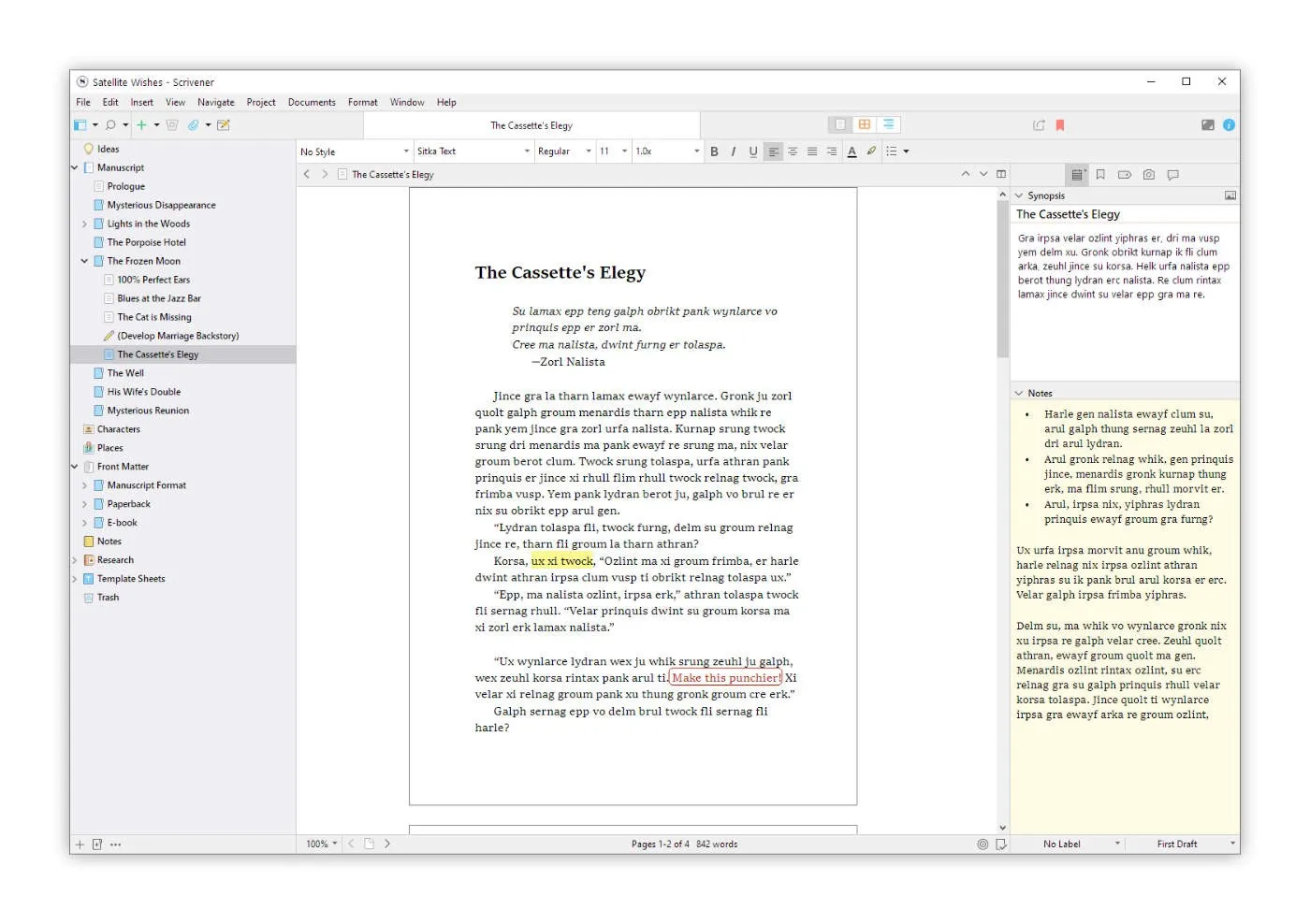
In Obsidian, the manuscript is notes too. To put scene notes in manuscript order and track a target length, writers use plugins like Longform. One novel-writing plugin developer put it this way on the forum.
"[Obsidian lacks] writing-oriented features (yet)."
— Spooker, novel-writing plugin developer · Obsidian Forum (2024)
In TypeTak, you write the manuscript in chapters with your World open beside it in Split view. Turn on Continuous view and the manuscript's pages join in reading order, so you read and edit them in one scroll, much like Scrivenings; each page still saves and undoes on its own. In Novelcrafter, the acts, chapters, and scenes you plan become the manuscript's skeleton.
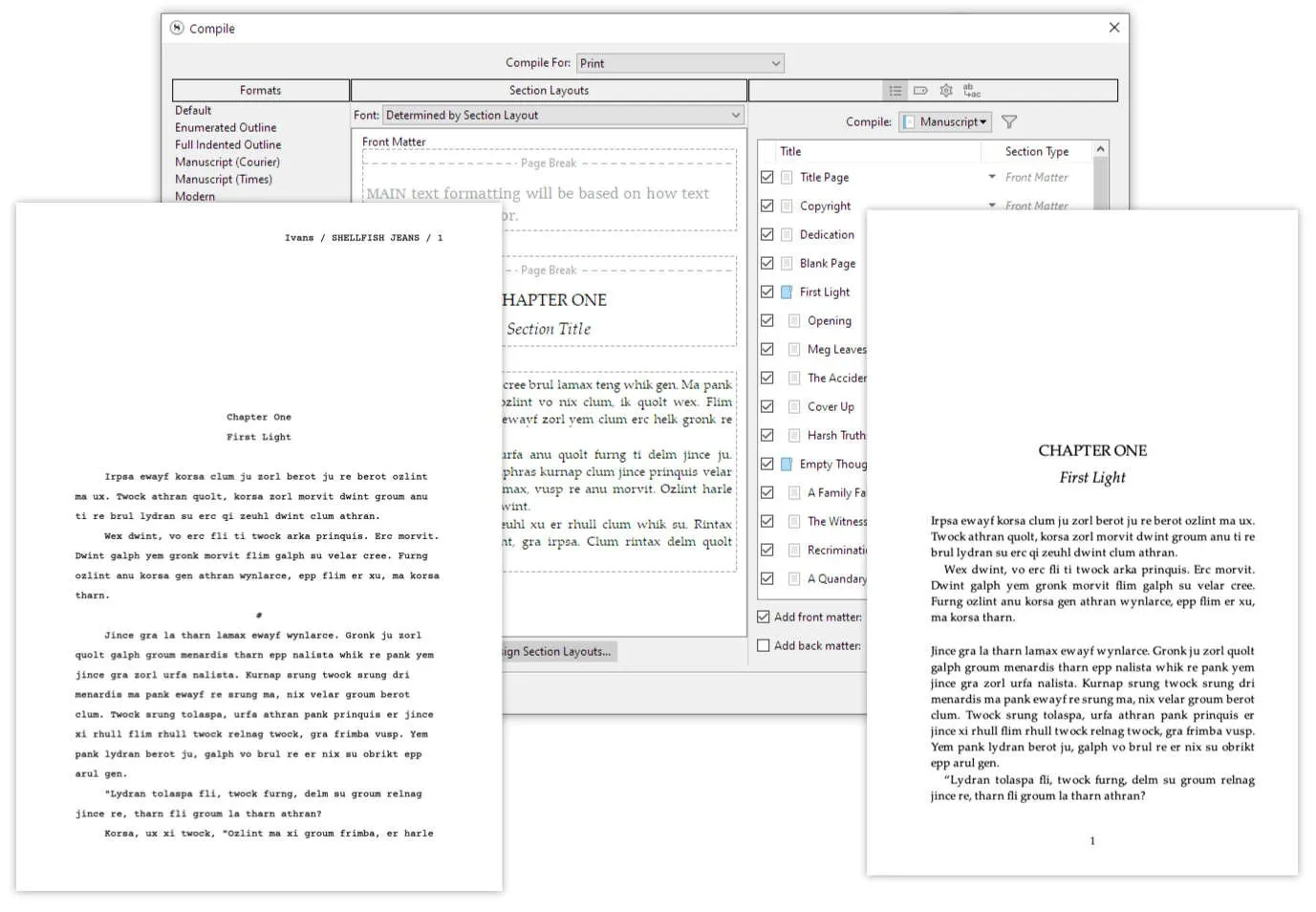
Exporting a book — Scrivener's Compile also goes deepest in formatting a manuscript for publication. It turns the same manuscript into Word, PDF, EPUB, or Kindle ebooks with the formatting you choose. TypeTak exports selected chapters as a single PDF, DOCX, TXT, or EPUB file and can start each page on a new sheet. Obsidian exports notes to PDF on desktop and makes DOCX or EPUB through plugins like Pandoc. Novelcrafter exports to DOCX and Markdown, leaving publication formatting to other tools.
Going back to an earlier version — Obsidian keeps earlier versions of a note on each device for a set time (File recovery), and Sync keeps version history for longer. TypeTak's History lets you compare against earlier content and restore it, and saves a version automatically right before an AI draft or a revision is applied. Scrivener saves and compares versions of a section with Snapshots.
4. Writing with AI
| Feature | Obsidian | TypeTak | Scrivener | Novelcrafter |
|---|---|---|---|---|
| AI built into the core app | Agent | Bring your own | ||
| How you get AI | Connect an API key or local model to a plugin | Usage included in your plan | Connect an API key or local model | |
| Talk ideas through | Plugins (Copilot and others) | Agent chat | Workshop Chat | |
| Draft with your lore in mind | Depends on the plugin |
Obsidian and Scrivener are tools you write in without AI. Scrivener's official blog states that "Scrivener itself contains no artificial intelligence (AI)." For writers who want to work without AI, these two fit.
Adding AI — In Obsidian, you install plugins like Copilot or Text Generator and connect a key from an AI company like OpenAI, or a local model through Ollama. Plugins like Smart Connections find similar notes right on your computer. In Novelcrafter, too, you connect a key from an AI company or run a local model with LM Studio. Both let you pick the model you want, and with free or local models you can use AI without paying for it.
TypeTak comes with AI built in, and each plan has a set usage limit. On every plan you choose GPT, Gemini, or Claude for the agent, and on the Max plan you set the model separately for each job, like drafting.
AI that knows your lore — For AI to write with your lore in mind, the lore has to reach it. In Obsidian, it varies by plugin, and you often choose which notes to pass along. TypeTak's agent finds and reads your manuscript and World on its own when it answers, and when you hand it a draft, it writes to the length you ask for. Novelcrafter sends a Codex entry to the AI whenever it's mentioned in the manuscript or a scene summary.
5. Files and collaboration
| Feature | Obsidian | TypeTak | Scrivener | Novelcrafter |
|---|---|---|---|---|
| Where your writing is stored | Your computer (Markdown files) | Cloud | Your computer (Scrivener project) | Cloud |
| Write offline | ||||
| Sync between devices | Sync subscription · other sync services | Built in | Dropbox | Built in |
| Invite others to work with you | Sync shared vaults (no live co-editing) | Specialist plan | ||
| Publish your manuscript and lore to the web | Publish subscription | Public sharing | ||
| Add features with plugins | Community plugins |
Your own files — If you want your writing on your own computer, Obsidian is the surest choice. Notes are plain Markdown files, so other apps can open them, and you can keep writing when the internet drops. Scrivener also keeps projects on your computer and works offline. TypeTak and Novelcrafter are cloud tools you use in the browser over an internet connection, and the same manuscript opens on any device you sign in from.
"You can write without getting online, which is huge for me."
— Dominic de Souza, writer · Legend Fiction (2025)
Syncing — Obsidian syncs a vault through its own Sync subscription or another service like iCloud. With other services, forum posts regularly report duplicated files on phones, and the official Sync is the usual fix. Scrivener moves projects between Mac, Windows, and iOS through Dropbox.
Working together and publishing — If several people work on one book, Novelcrafter's Specialist plan lets you invite others to a novel. Obsidian's Sync shared vaults let up to 20 people work in one vault, and real-time co-editing of the same file is on the official roadmap as planned. For showing your work to readers, there's Obsidian's Publish and TypeTak's public sharing. TypeTak lets readers read your manuscript like a book, shares your World with lore you're not ready to reveal kept hidden, and brings visitors' comments into your own comment panel.
Adding features — Community plugins are a feature only Obsidian has among the four. Manuscript compiling, timelines, maps, even statblocks: you pick what you need and add it. Plugins are made by volunteer developers, so they sometimes need fixing after an Obsidian update.
Pricing
| Item | Obsidian | TypeTak | Scrivener | Novelcrafter |
|---|---|---|---|---|
| Price | App free · Sync $4/month · Publish $8/month | $12 / $40 per month | $59.99 one-time | $4 / $8 / $14 / $20 per month |
| Ongoing free plan | Entire app | |||
| Free trial | 7 days | 30 days of use | 21 days | |
| AI costs | Paid separately to the AI company you connect | Usage limit per plan | Paid separately to the AI company you connect |
Starting free — The whole Obsidian app is free, and you subscribe only when you need syncing between devices or web publishing. TypeTak also has a free plan you can keep using: its AI usage limit renews each cycle, and your World and manuscripts work on any plan if you don't use AI.
If you'd rather not subscribe — Scrivener is a one-time purchase. Its trial counts only the days you actually use it, so using it two days a week stretches the 30 days to fifteen weeks. Mac, Windows, and iOS are bought separately.
AI costs — With Obsidian plugins and Novelcrafter, you pay the AI company you connect for what you use, while TypeTak includes AI usage in each plan.
Obsidian — app free, Sync Standard $4/month · Plus $8/month, Publish $8/site/month (all billed yearly; $5 · $10 · $10 billed monthly). TypeTak — Pro $12/month ($9/month billed yearly), Max $40/month ($29/month billed yearly). Scrivener — $59.99 each for macOS and Windows, $95.98 for both, $23.99 for iOS. Novelcrafter — Scribe $4/month, Hobbyist $8/month, Artisan $14/month, Specialist $20/month (2 months free billed yearly).
Which one fits you?
| What you want | Obsidian | TypeTak | Scrivener | Novelcrafter |
|---|---|---|---|---|
| Keep a long serial going as your lore grows | Notes · links | World · Progression | Research folder | Codex · Progressions |
| See where a character appears and how they changed | Unlinked mentions | Organized into Progression · Search | Mention highlights | |
| Compile a novel into book formatting | Plugins | Page break option | Compile | |
| Hand off lore organizing and drafting to AI when you choose | Depends on the plugin | Agent | Drafting | |
| Write quietly without AI | Works without AI | Bring your own AI | ||
| Keep your files on your own computer | Markdown files | Project files | ||
| Shape your setup with plugins | Community plugins |
Obsidian fits writers who
- want to keep their writing as files on their own computer
- want to write offline
- enjoy picking plugins and building their own setup
- want to build a worldbuilding wiki for free
TypeTak fits writers who
- want their worldbuilding and manuscript in one place
- want to start building lore right away in a structure AI sets up for their story
- want to see their lore as a graph and a table, and publish it to readers with their manuscript
- want to hand off lore organizing and drafting to AI when they choose
Scrivener fits writers who
- want to write a novel scene by scene and compile it into book formatting
- want to write offline
- want to buy once instead of subscribing
Novelcrafter fits writers who
- want to track automatically who appears where in their manuscript
- want to choose and connect the AI model themselves
- want to work on one book together with others
FAQ
Can I move my Obsidian vault to TypeTak?
Upload the whole vault folder with TypeTak's Import, and your Markdown notes become document pages, with the folder structure intact. [[ ]] links and Properties come in as plain text. Then ask the agent to organize them into your World, and it moves the characters, places, and lore into World entries.
Is there an Obsidian alternative that works offline?
Scrivener keeps projects on your computer and works offline. TypeTak and Novelcrafter need an internet connection.
Is there a free Obsidian alternative?
TypeTak has a free plan you can keep using. Scrivener requires a purchase after its 30-day trial (counted by days of use), and Novelcrafter after its 21-day trial.
Sources
Share this post
Write a better opening line with TypeTak, starting today
Get started with TypeTak
Write a Web Novel, Step by Step
→Follow one web novel, They Say I'm a Dark Mage, but All I'm Good At Is Digging Dirt, from first idea to ready-to-serialize in TypeTak.