
Best AI for Writing a Novel
This post is written by the TypeTak team, and TypeTak is one of the tools compared. Read it with that in mind. Prices and features come from each tool's official pages as of October 2026 and may change.
What is an AI novel editor?
An AI novel editor puts the manuscript, your story bible, and the AI in one place. You can write fiction with a general AI chat like ChatGPT or Claude, but a chat is built around conversations, so your manuscript and notes live somewhere else and get pasted in as you go. In an AI novel editor, the AI reads your manuscript and lore directly, and what you write becomes the manuscript right where you wrote it.
Here we line up four AI novel editors (TypeTak, Sudowrite, Novelcrafter, and NovelAI) with the two general AI chats, ChatGPT and Claude.
What to look for
The problem writers run into most with AI is the AI forgetting what was already decided. If a character's voice or powers from chapter 3 come out different in the chapter 30 draft, fixing it can take longer than the AI saved you. So this comparison starts with how each tool remembers your lore.
- Remembering your lore: where characters, places, and rules live, and how the AI reads them while it writes
- Drafting: whether it drafts a scene or chapter at a time, and keeps to your length and style
- Revision: whether you can rework a selected passage and get feedback on the whole manuscript
- The writing screen: whether it's comfortable for long sessions
- Pricing: how the cost grows in a month when you use the AI a lot
1. Remembering your lore
| Feature | TypeTak | Sudowrite | Novelcrafter | NovelAI | ChatGPT · Claude |
|---|---|---|---|---|---|
| Organize characters, places, and lore as entries | World | Story Bible | Codex | Lorebook | Upload files to a project |
| AI draws on lore while writing | When mentioned | When a keyword appears | Project files | ||
| AI fills in entries | Lorebook Generator | ||||
| Pulls lore from an imported manuscript | Character extraction | ||||
| Collects lore decided in conversation | |||||
| Set where and how much of each entry goes to the AI | |||||
| Track where entries appear in the manuscript | Mentions · heatmap | ||||
| Track lore that changes over time | Spans | Progressions | |||
| Relationship map (graph) | Relations list | ||||
| Share lore across manuscripts (a series) | Move by file | Within one project |
The AI knows nothing outside the text it's reading right now. So all five keep your lore somewhere separate and have the AI read it as it writes. They differ in how easily that lore builds up and how closely it's tied to the manuscript.
Where your lore lives — TypeTak's World treats each entry as a document in its own right. You write the body in an editor that shows formatting as you type, and link other characters and events so one click takes you there. Every place that links to an entry gathers in its backlinks, so you can later find every place you mentioned it.
Sudowrite's Story Bible is both a place for your lore and the starting point the story is generated from. Give it a few lines of ideas and a synopsis, and the AI fills in character and worldbuilding cards that feed straight into the outline and draft. In ChatGPT and Claude, you upload your notes to a project and add instructions, and every chat in that project draws on them. When the lore changes, you edit the file and upload it again.
"I've had it change a character's name mid-story and transform another's curly hair into a spiky hairdo for no reason."
— Amanda Caswell, Tom's Guide (2024)
Feeding lore to the AI — Once your lore runs to hundreds of entries, the AI can't read it all at once, so only what the current scene needs should go in. TypeTak, Novelcrafter, and NovelAI pass an entry to the AI when its name shows up in the text. Of these, NovelAI's Lorebook gives you the finest control over when, and how much, lore reaches the AI: keywords can be regular expressions, and for each entry you set whether it's always in, how long it can run, and where it goes in the context. On paid plans, Claude switches a large project to searching its knowledge for the parts it needs, which lets a project hold up to ten times more material.
Worldbuilding in conversation — your lore builds up as you talk. New characters, places, and rules get decided as you talk with the agent. TypeTak collects what you decide in the World backlog below the chat box; click Organize and it's filed into your World, with the conversation it came from as its source, so you can always check why you decided it.
Relationship graph — see who's tied to whom at a glance. In TypeTak, record a relationship as a field and it becomes a line in the graph, so the whole web is visible without drawing a chart yourself. A relationship you record on one side shows up on the other too. Novelcrafter's Codex stores relationships as a list.
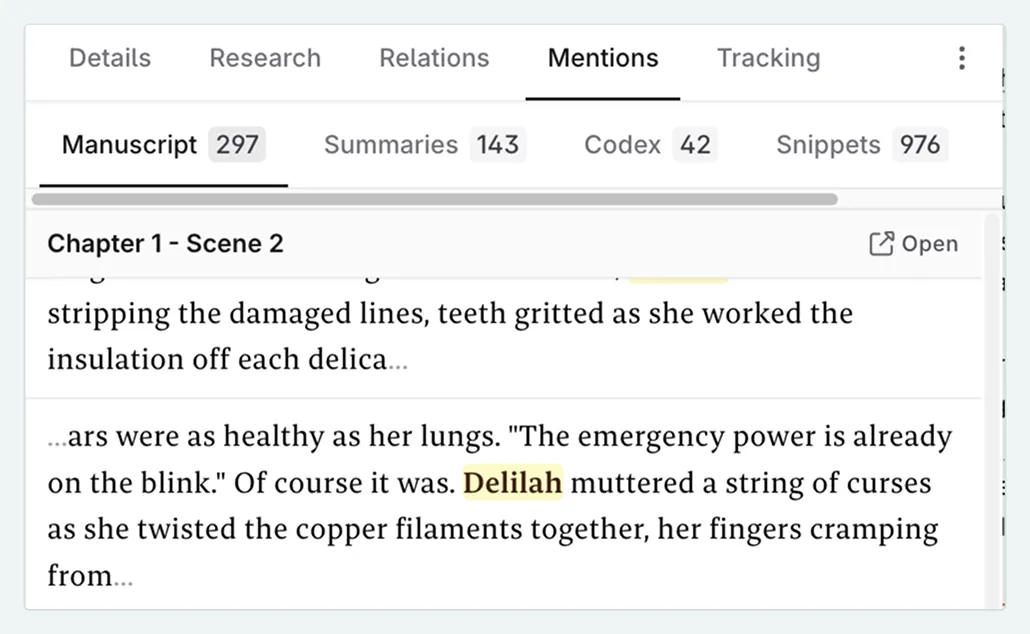
Tracking appearances — Novelcrafter's Codex ties in most closely with the manuscript. Register names and aliases, and it finds mentions across your manuscript, scene summaries, and chats, with a heatmap of who appears in which scene. Of the five, only Novelcrafter has this, and it's handy for spotting a character who's been offstage too long.
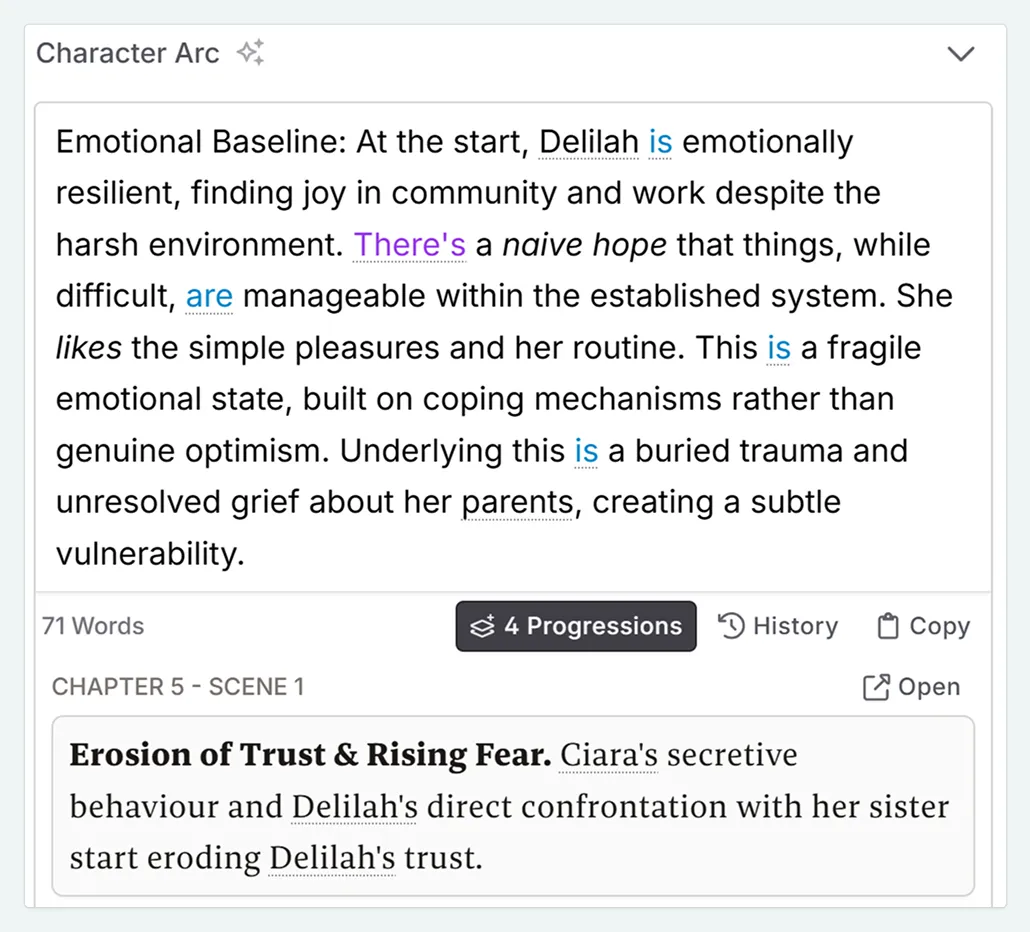
Lore over time — For lore that changes along the way, like a title or an allegiance, Novelcrafter's Progressions record each stage separately. TypeTak keeps these changes as spans instead of overwriting them, so a change mid-serial doesn't get mixed up with earlier chapters.
2. Drafting
| Feature | TypeTak | Sudowrite | Novelcrafter | NovelAI | ChatGPT · Claude |
|---|---|---|---|---|---|
| Draft a whole scene or chapter | Drafting | Draft | Scene beats | Repeated continuation | Ask in chat |
| A screen for planning scene by scene | A board in the World | Chapter beats | Plan · scene beats | ||
| Review and adjust a plan before drafting | Draft plan | Scene check before generating | In conversation | ||
| Hit a target length | Pick a length per beat | ||||
| Set a prose style | Writing Style | Style in the Story Bible | Written into prompts | Author's Note | Written into project instructions |
| Fiction-specific model | Muse | Its own models | |||
| Choose the model | Gemini or GPT | Connect any model | Among its own models | Among that company's models |
Each tool gets you past a stuck scene in its own way. All but NovelAI draft a scene or chapter at a time, while NovelAI builds a scene through short continuations. Which feels better depends on how much of the story you plan ahead.
Drafting through conversation — In TypeTak, you get to a draft by talking it through with the agent. Click Organize and the plot points you settled in conversation are filed as cards on a board in your World, such as one called "Story". When you hand off a draft, you can see the plan first: adjust the outline and length on the draft plan card in chat, confirm, and it writes to that plan; ask it to just write, and it goes straight ahead.
ChatGPT and Claude also draft in conversation. To get another version, you send the request again, or you open the text in a window beside the chat (ChatGPT's canvas, Claude's artifacts) and ask for changes. Then you copy the draft over to wherever you keep the manuscript.
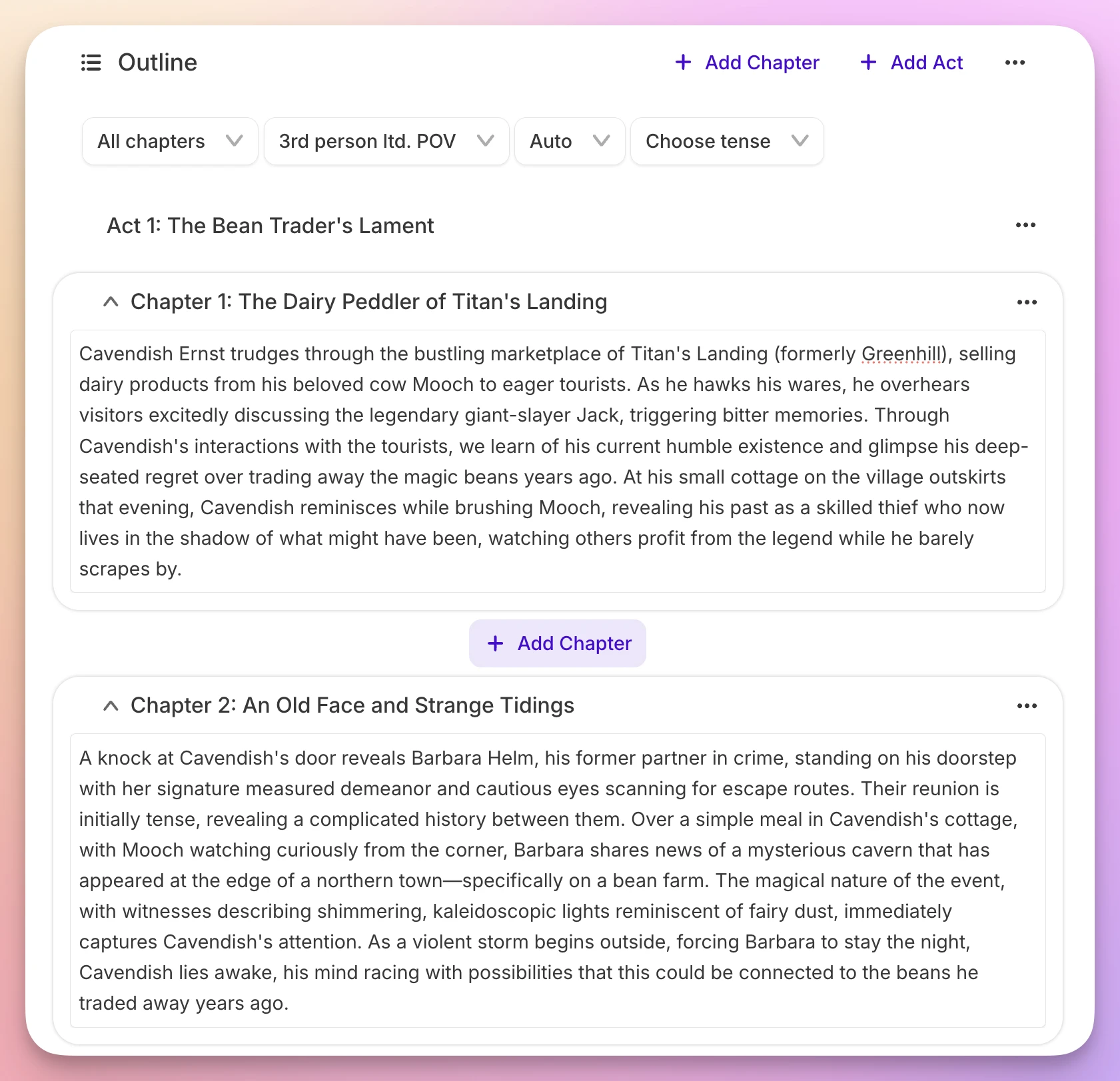
Step-by-step drafting — Sudowrite has more generation tools than anything else in the category. In the Story Bible you generate and edit a synopsis, an outline, and chapter beats in turn, then turn those beats into a chapter with Draft. The stages are laid out for you, so it's easy to follow even the first time. Novelcrafter splits the book into acts, chapters, and scenes on its Plan screen; you put a beat for what the scene should cover in its place and generate prose from it, and you can edit the prompts used to generate.
A passage at a time — In NovelAI, you and the AI take turns building the story. Each press of generate adds up to 600 characters, and if you don't like it, you retry for another version. Every version stays as a branch, so you can go back and take a different path. Working in short steps makes it easy to steer paragraph by paragraph.
Hitting your target length — If every chapter of your serial has to hit a set length, the count matters. AI models rarely keep to a requested length, so TypeTak runs the draft through a separate step to hit the length set on the draft plan card. Novelcrafter puts the length you pick for each beat into the prompt.
Keeping your voice — If you want drafts in your own style, TypeTak and Sudowrite make it easiest. Note point of view, sentence rhythm, how you handle dialogue and description, and pacing in TypeTak's Writing Style or Sudowrite's Style, and drafts follow it; either can also read a sample of your prose and write the style for you. In ChatGPT and Claude, you describe your style in the project instructions; in NovelAI, in the Author's Note.
Fiction-trained models — If general AI prose feels flat to you, Sudowrite and NovelAI are worth a try. Sudowrite uses Muse, its own model trained on published fiction, and NovelAI uses its own models trained for storytelling. Sudowrite also offers more than thirty other models. Some users still preferred a general AI.
"I got better suggestions from ChatGPT and Deepseek."
— Daniel Gerber · Trustpilot (2026)
3. Revision
| Feature | TypeTak | Sudowrite | Novelcrafter | NovelAI | ChatGPT · Claude |
|---|---|---|---|---|---|
| Rewrite a selected passage | Rephrase | Rewrite | Text Replacement | Ask in chat or canvas | |
| Add description or build out a scene | Enhance | Describe · Expand | Text Replacement | Ask in chat | |
| Make your own revision tools | Skills | Plugins | Custom Prompts | Project instructions | |
| Feedback on the manuscript | Feedback | Feedback | Workshop Chat | Ask in chat | |
| Comments and alternatives on sentences to fix | Revision | From the Professional plan | Suggest edits in ChatGPT's canvas | ||
| Spelling and grammar | Proofreading | Ask in chat |
Revising usually takes longer than drafting. How much work it is depends on whether you select a passage and fix it right in the editor, or paste it into a chat and copy the result back.
Bringing prose to life — TypeTak lets you choose exactly how a passage should change. Enhance has nine tools that pull in different directions, such as Sceneify, Dialogue, and Inner voice, and Rephrase shows several options; pick one and it goes straight into the manuscript.
Sudowrite is strong at making prose read like fiction. Rewrite reworks a passage, Describe adds sensory detail, and Expand builds out a rushed scene, with more than 1,000 community plugins on top. In Novelcrafter, you call up Expand, Rephrase, or Shorten from the selection menu, and if none of them fits, you build your own with Custom Prompts and keep it in the same menu.
"Some of the tools like Write/Expand keep tone and plot consistent across paragraphs."
— Anonymous user · Capterra (2026)
Polishing the whole manuscript — In TypeTak, you revise the whole page from the editor toolbar. Revision adds comments and alternatives to sentences that need fixing, Proofreading marks spelling, grammar, and awkward phrasing, and Feedback points out where the text contradicts your World. Every suggestion appears on the page, and you apply only what you like.
Sudowrite's Feedback names five areas to improve, and developmental edits, line edits, and beta reads start at the Professional plan. Paste a manuscript into ChatGPT or Claude and ask for notes, and you get a long, detailed reply. In ChatGPT's canvas, Suggest edits leaves a comment on each spot to fix.
4. The writing screen
| Feature | TypeTak | Sudowrite | Novelcrafter | NovelAI | ChatGPT · Claude |
|---|---|---|---|---|---|
| Interface language | 10 languages | English | English | English · Japanese | Many languages |
| Dark theme | Theme editor | ||||
| Focus mode | Hide the toolbar · close the sidebar | Full screen | |||
| Two pages side by side | Split view | Pin tools alongside | One text beside the chat |
You spend hours in these tools, so a comfortable screen matters. The four AI novel editors put the manuscript in the middle with lists and tools on either side. ChatGPT and Claude put the conversation in the middle and open your text in a window beside it.
Built for long sessions — TypeTak's Split view keeps your World notes or an earlier chapter open beside the page as you write. Typewriter mode holds the line you're writing at the middle of the screen, so your eyes don't drift to the bottom as the text grows.
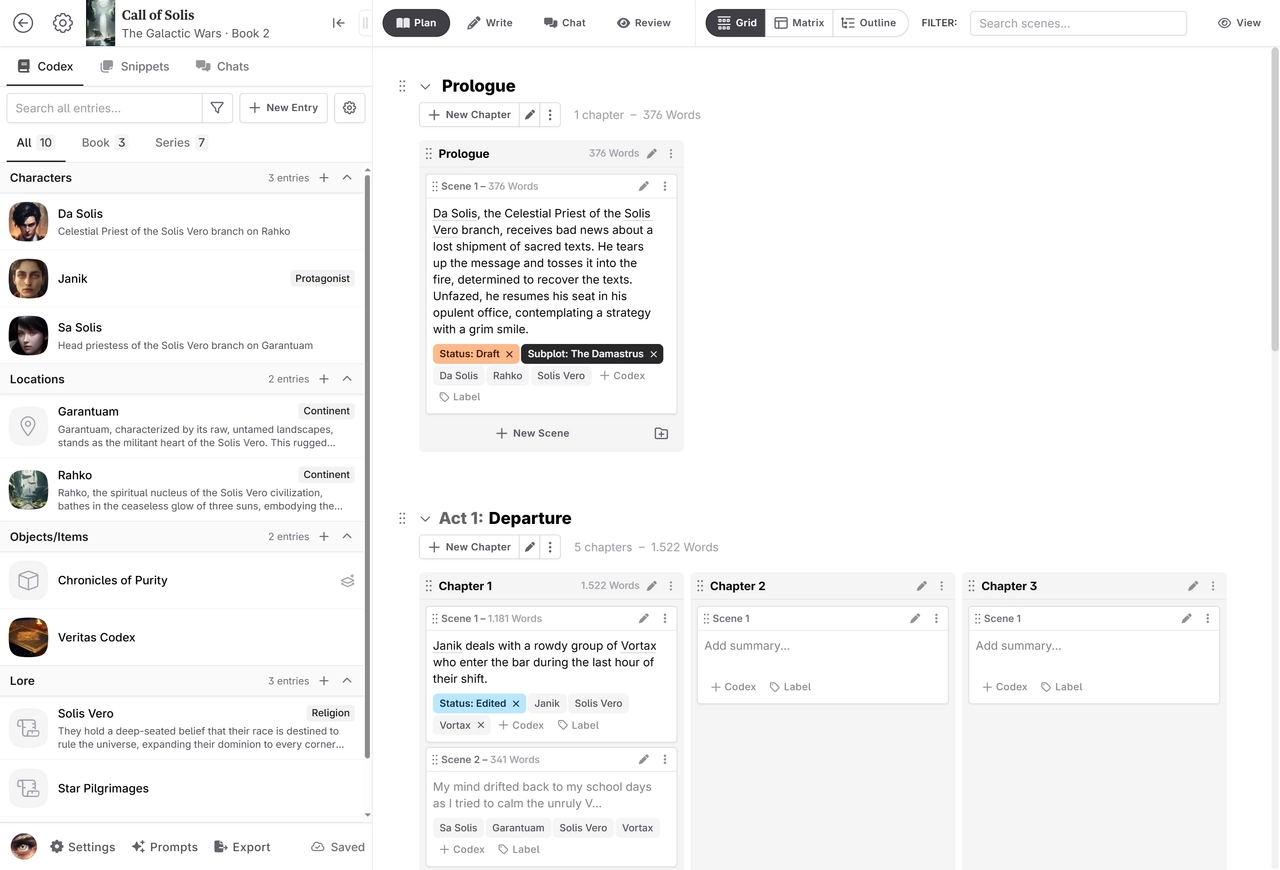
Where the tools sit — Sudowrite lines Write, Rewrite, Describe, and Brainstorm buttons across the top of the manuscript and stacks results in boxes on the right, so tools are easy to find. Novelcrafter switches between Plan, Write, Chat, and Review with tabs along the top and keeps the Codex in the left sidebar for lookups mid-draft. NovelAI colors text by whether you or the AI wrote it, so you always know which sentences are yours.
Pricing
| Item | TypeTak | Sudowrite | Novelcrafter | NovelAI | ChatGPT · Claude |
|---|---|---|---|---|---|
| Monthly price | $12 / $40 | $10 / $22 / $44 | $4 / $8 / $14 / $20 | $10 / $15 / $25 | From $20 |
| Ongoing free plan | |||||
| Free trial | 7 days | 21 days | 50 text generations | ||
| AI usage | Usage limit per plan | Credits per plan | Your own AI key | Unlimited text generation | Usage limit per plan |
Usage included in the plan — TypeTak, Sudowrite, ChatGPT, and Claude give each plan a set amount of AI use. When it runs out, you wait for the next cycle or upgrade. On TypeTak you can add extra usage for a busy month and scale it back afterward. To keep writing without paying, TypeTak, ChatGPT, and Claude have free plans.
Unlimited generation — NovelAI's paid plans put no cap on text generations. Higher plans let the AI read further back in your text at once.
Bring your own AI — Novelcrafter's subscription doesn't include AI costs. From the Hobbyist plan up, you connect a key from an AI provider and pay that provider separately. Connect a free model on OpenRouter or a model running on your own computer, and you can use AI without paying for it, though you'll need to get a key or install a model first.
TypeTak — Pro $12/month ($9/month billed yearly), Max $40/month ($29/month billed yearly). Sudowrite — Hobby & Student $10/month, Professional $22/month, Max $44/month (up to 50% off billed yearly). Novelcrafter — Scribe $4/month (no AI), Hobbyist $8/month, Artisan $14/month, Specialist $20/month (two months free billed yearly). NovelAI — Tablet $10/month, Scroll $15/month, Opus $25/month. ChatGPT — Plus $20/month, with Pro above it. Claude — Pro $20/month ($17/month billed yearly), Max from $100/month.
Which one fits you?
TypeTak fits writers who
- write serials and want the AI to keep to earlier lore as chapters pile up
- need each chapter to hit a set length
- want to talk through their world and plot, keep it organized, and see it as a graph and tables
Sudowrite fits writers who
- want several options for the next lines whenever they're stuck
- want to follow set stages from synopsis to draft
- want to try a fiction-trained model
Novelcrafter fits writers who
- want to plan in detail with scene beats and track where characters appear
- want to pick their own model and connect it with their own AI key
NovelAI fits writers who
- want to trade passages back and forth with the AI
- want to generate as much as they like
- want to try a fiction-trained model
ChatGPT and Claude fit writers who
- want to brainstorm and try short pieces in an AI chat they already use
- use AI for plenty besides writing
FAQ
Can I write a full novel with ChatGPT or Claude?
Yes. Put your notes and instructions in a project, and every chat in it draws on the same material. Keep the manuscript elsewhere, and update the files whenever your lore changes. For what to watch out for when writing with a general AI chat, see How to Write a Web Novel with AI in 7 Steps.
Is there a free AI novel editor?
TypeTak has a free plan that renews each cycle. Sudowrite, Novelcrafter, and NovelAI need a paid plan once the trial ends, and ChatGPT and Claude can be used on their free plans.
Can I publish a novel I wrote with AI?
It depends on where you publish. Some platforms and publishers don't accept AI-assisted work or ask you to disclose it, so check their policy before you post or submit.
Can I see a real record of writing with AI?
We took a web novel from a one-line idea to a revised chapter 1 in TypeTak and published every step in the course Write a Web Novel, Step by Step.
Sources
- TypeTak: Guide
- Sudowrite: Pricing, Scenes & Draft, Characters, Worldbuilding, Muse
- Novelcrafter: Pricing, Features, Codex entry anatomy, Scene Beat, Using AI for free
- NovelAI: Subscription, Lorebook
- ChatGPT: Pricing, Projects, Canvas
- Claude: Pricing, Projects, Artifacts
- Reviews: Capterra Sudowrite reviews, Trustpilot Sudowrite reviews, Tom's Guide — Amanda Caswell
Share This Post
Change your first sentence with TypeTak today
Start TypeTakView More Content
→Find out how TypeTak is built, how to use it, and what helps you write.