
Novelcrafter Alternatives
This post was written by the TypeTak team. Our own product is part of the comparison, so please read with that in mind. Prices and features reflect each service's official pages as of October 2026 and may change.
What is Novelcrafter?
Novelcrafter is a writing tool for novelists who build their book from the structure up. You plan the book in acts, chapters, and scenes, keep your characters and world in the Codex, and write scenes with AI on top of that.
Its defining trait is that it doesn't provide AI itself. You connect an API key from a service like OpenRouter, or run a model on your own computer with LM Studio. That keeps the subscription low, and you pay the service you connect for AI usage separately.
Why writers use Novelcrafter
Writers use it to handle structure and lore closely while running AI their own way. When a new model comes out, they switch to it right away, and they edit the prompts sent to the AI themselves. The Codex finds mentions in the manuscript on its own and shows who appears in which scene.
On the other hand, getting a key and connecting it before the AI works takes some setup, and paying for the subscription and the AI separately can feel like a burden.
Below, we compare five features side by side with TypeTak, Sudowrite, and Squibler: planning, lore management, drafting, AI models and prompts, and revision.
1. Planning
| Feature | Novelcrafter | TypeTak | Sudowrite | Squibler |
|---|---|---|---|---|
| Structure the book in acts, chapters, and scenes | Plan | A board in the World | Outline · chapter beats | Folders · files |
| Switch the same structure between views | Grid · Matrix · Outline | Board · table | ||
| Show the characters and places in each scene | Found automatically | Entry chips on cards | ||
| AI drafts the structure | Agent | Synopsis → outline | Organize | |
| Plan in conversation | Workshop Chat | World backlog → board | AI chat |
Novelcrafter, TypeTak, Sudowrite, and Squibler all structure a story in chapters and scenes.
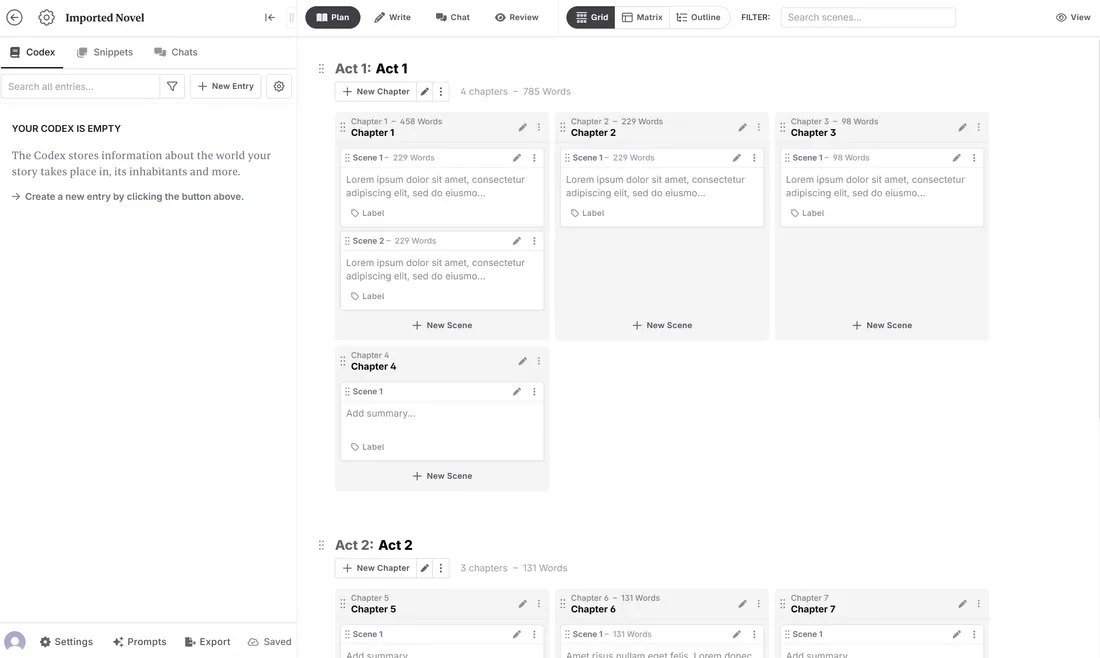
Novelcrafter's Plan has the deepest planning screen of the four. You see the same structure as a card board (Grid), a table with scenes against characters and subplots (Matrix), or an outline of scene summaries (Outline). When a name registered in the Codex appears in a scene, it's found and marked automatically, so the Matrix shows at a glance who appears where.
TypeTak plans the story in conversation with the agent. Make a board in your World (call it "Story"), and plot points you settle in conversation collect in the World backlog below the chat box; click Organize to file them onto the board as cards. You decide which fields the cards have and how they're organized, and you can switch the board to a table to scan the plot scene by scene, one row each.
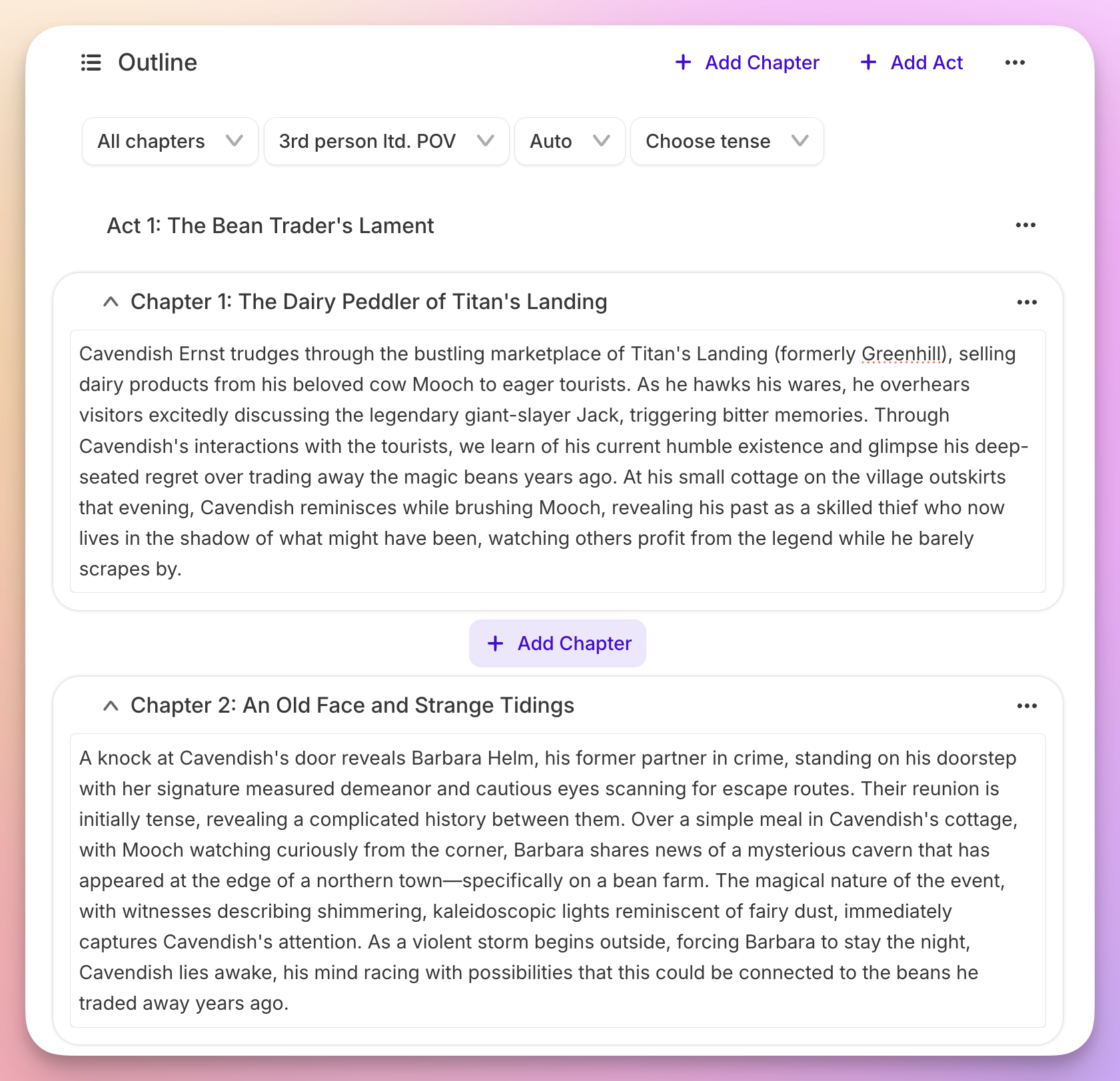
Sudowrite generates the structure step by step in the Story Bible. From an idea and synopsis it generates an outline, and from the outline, chapter beats, each with a button and each one editable. The fixed steps make it easy to follow.
Squibler has the AI build your book's folders, files, Elements, and even a cover from an idea. From there, click Organize to pick an outlining task, or ask for the structure you want directly in chat.
2. Lore management
| Feature | Novelcrafter | TypeTak | Sudowrite | Squibler |
|---|---|---|---|---|
| Organize characters, places, and lore as entries you can edit | Codex | World | Story Bible | Elements |
| Set fields per type | Attribute boxes | |||
| AI fills in entries | When generating a book | |||
| Pulls lore from an imported manuscript | Character extraction | |||
| Collects lore decided in conversation | ||||
| AI draws on lore while writing | When mentioned | |||
| Links and backlinks between entries | Relations | |||
| Track where entries appear in the manuscript | Mentions · heatmap | |||
| Track lore that changes over time | Progressions | Spans | ||
| Relationship map (graph) | Relations list | |||
| Share lore across manuscripts (a series) | ||||
| Publish your lore by link |
Novelcrafter, TypeTak, Sudowrite, and Squibler all organize characters, places, and lore as entries that the AI draws on while writing.
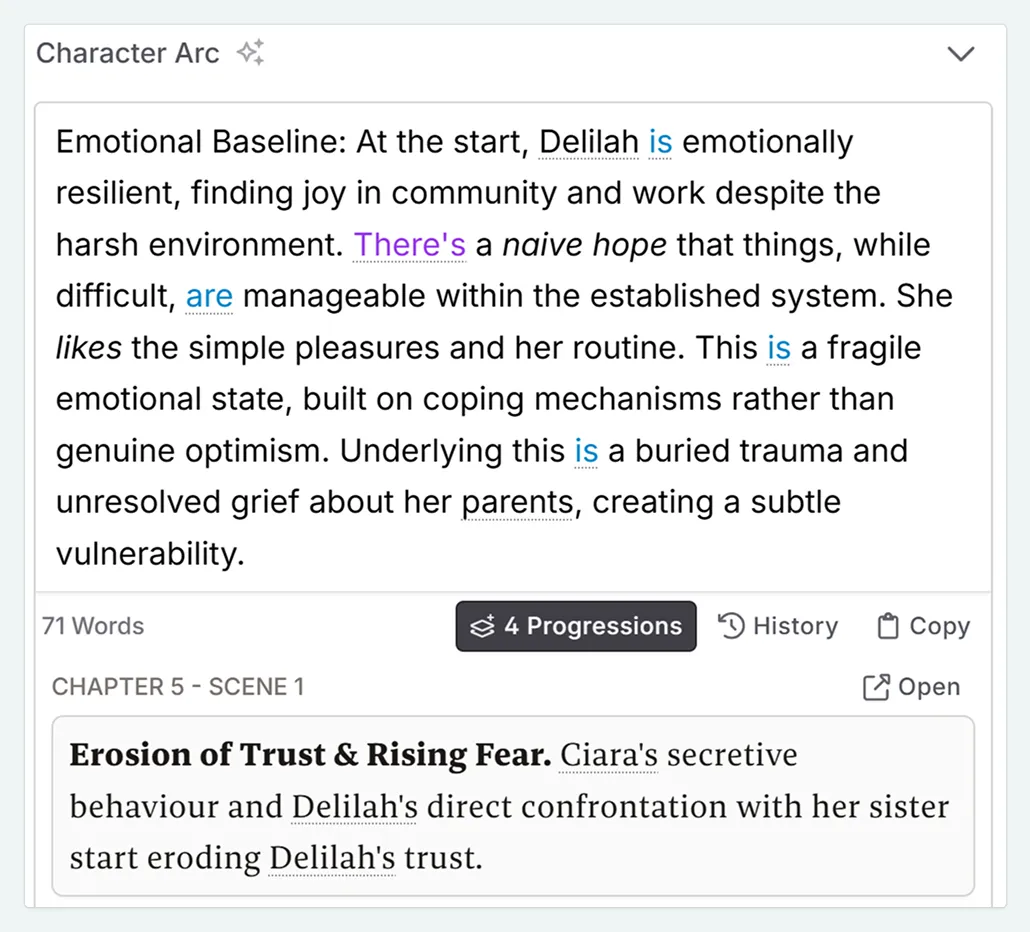
Novelcrafter's Codex ties in most closely with the manuscript.
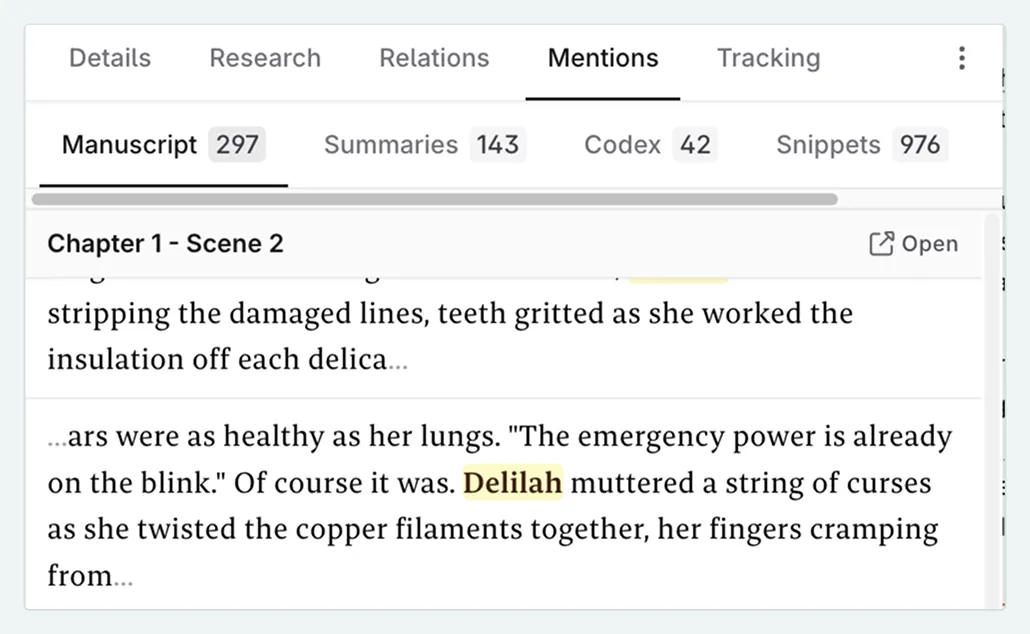
Tracking appearances — see who shows up in which scene. Register names and aliases, and the Codex finds mentions across your manuscript, scene summaries, and chats, with a heatmap of who appears in which scene. No other tool of the four has this. The same mentions decide what goes to the AI: for each entry, you choose whether the AI always gets it, gets it only when mentioned, or never does.
Lore over time — keep what changes mid-story. Lore that changes along the way, like a title or who rules a city, is kept by period with Progressions. TypeTak also keeps it without overwriting, as spans. Entries connect as a list in the Relations tab, and every book in a series shares one Codex.
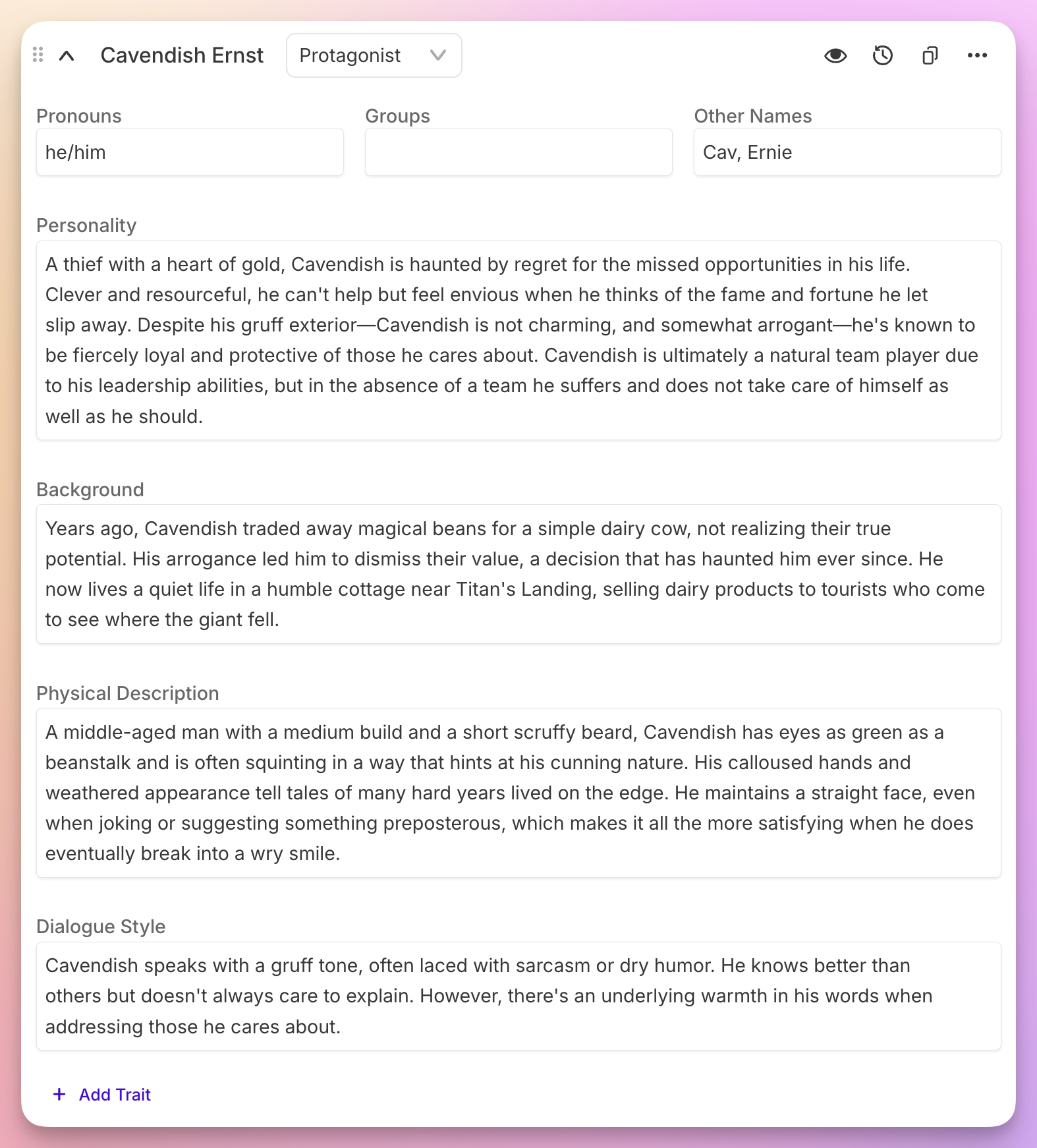
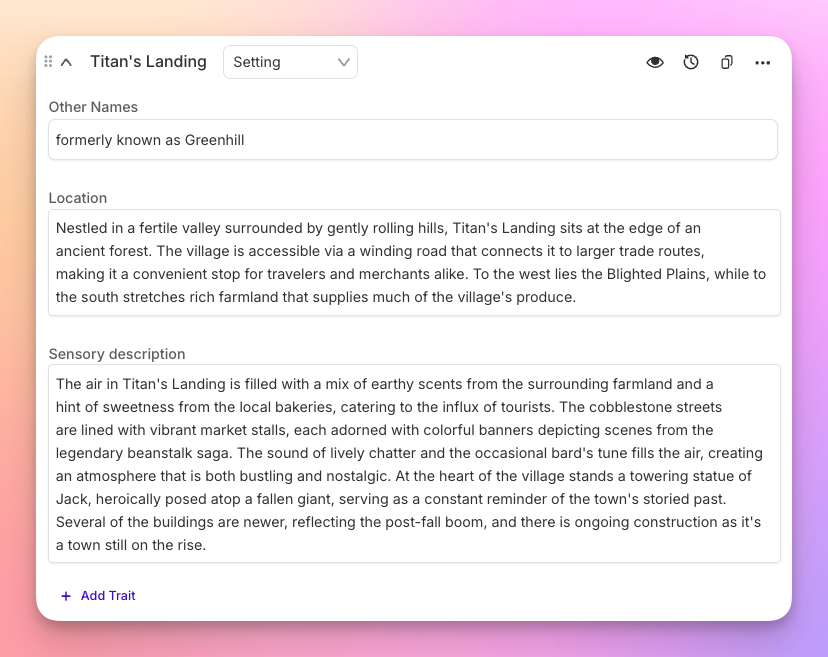
TypeTak's World has the most modern lore editor of the four, and it treats your worldbuilding as content in its own right. Every entry has a property table that stores not just text but other entries and options as values. The body is written in a Markdown editor: add headings, lists, and bold to the document, and link other characters and events so one click takes you there.
Relationship graph — see who's tied to whom at a glance. In TypeTak, record a relationship as a field and it becomes a line in the graph, so the whole web is visible without drawing a chart yourself. A relationship you record on one side shows up on the other too.
Table — compare characters and places side by side. All entries of a type are laid out in one table, with fields like age, occupation, and affiliation lined up for comparison. Change a type's fields and every entry changes, existing ones included.
Worldbuilding in conversation — your lore builds up as you talk with the agent. New characters, places, and rules get decided as you talk with the agent. TypeTak collects what you decide in the World backlog below the chat box; click Organize and it's filed into your World.
Publishing your World — share your world's encyclopedia with others. Pick the manuscripts and World to publish, and anyone can read them from one link, no login needed. Visitors browse your lore as cards and a graph, read the manuscript like a book, and leave comments. Lore you're not ready to reveal stays hidden.
Sudowrite's Story Bible is less a place to file lore than the starting point the story is generated from. With a few lines of an idea and a synopsis, the AI creates and fills character and worldbuilding cards, and those cards feed straight into outline and draft generation. Lore you don't want the AI to see yet, like the ending, can be hidden by card or by field.
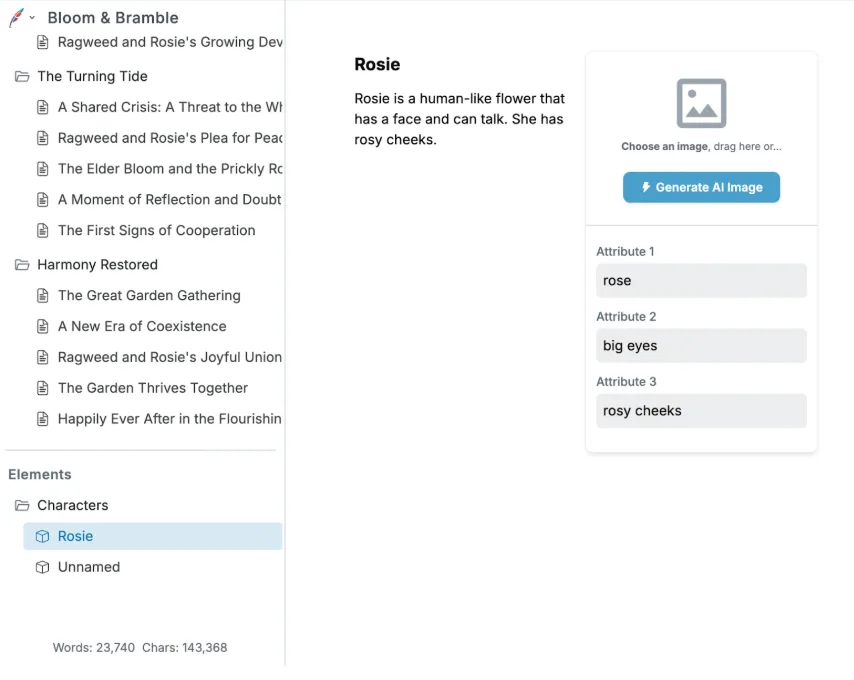
Squibler's Elements organize characters, settings, and objects with a name, a description, and attribute boxes, grouped into folders. You can generate an image for each element, and the AI draws on what you wrote in Elements when it writes.
3. Drafting
| Feature | Novelcrafter | TypeTak | Sudowrite | Squibler |
|---|---|---|---|---|
| Draft a whole scene or chapter | Scene beats | Drafting | Draft | Whole book at once |
| Draw on your organized lore while drafting | Codex | World | Story Bible | Elements |
| Generate a whole book in one go | Book generation | |||
| Review and adjust a plan before drafting | Draft plan | Scene check before generating | ||
| Set a draft length and stick to it | Pick a length per beat | |||
| Set a prose style | Written into prompts | Writing Style | Style in the Story Bible | Instructions in AI Chat Settings |
Novelcrafter, TypeTak, and Sudowrite all draft a scene or chapter at a time, and all four draw on your organized lore while drafting.
Novelcrafter drafts from scene beats. You write what should happen in a scene as a beat, then generate the scene's prose from it. You pick the length you want, which goes into the prompt, and if the result misses, you revise the beat and generate again.
TypeTak's agent can show you its plan before it drafts. Adjust the outline and length on the draft plan card in chat, confirm, and it writes to that plan; ask it to just write, and it goes straight ahead.
TypeTak writes to the length you want. AI models rarely keep to a requested length, so when you set a character count on the draft plan card, the draft goes through a separate step to hit it. Novelcrafter, Sudowrite, and Squibler have no such step: Novelcrafter puts the length you pick for each beat into the prompt, and on Sudowrite, the number of scenes roughly sets the length.
Sudowrite drafts a chapter scene by scene with Draft. You write the scene list yourself or generate it from the chapter summary in your Outline. When you hit Generate, Draft first checks whether any scene is too thin or tries to cover too much, suggests fixes, and estimates the word count and credits.
Squibler starts generating a book as soon as you enter its details and land in the editor. You watch the AI build the folders, files, Elements, and cover in the right sidebar, then read and revise in the editor once it's done.
Prose style goes into prompts or instructions on Novelcrafter and Squibler, while TypeTak and Sudowrite keep it as its own setting that drafts follow. In TypeTak's Writing Style and Sudowrite's Style, you note point of view, sentence rhythm, and how you handle dialogue and description, and drafts keep to it — both can also read a sample of your writing and sum up your style for you. TypeTak applies its Writing Style to Revision and Feedback as well. On Squibler, you note genre and style preferences in the instructions box in AI Chat Settings.
4. AI models and prompts
| Feature | Novelcrafter | TypeTak | Sudowrite | Squibler |
|---|---|---|---|---|
| AI usage included in the subscription | ||||
| Choose the model | Connect any model | Gemini or GPT | ||
| Connect your own API key or a local model | ||||
| Edit the prompts sent to the AI | Guidance · Skills | Plugins | Instructions |
TypeTak, Sudowrite, and Squibler include AI usage in the subscription, so they work right away with no setup.
Novelcrafter gives you the most freedom with AI. Pick from more than a hundred models through OpenRouter, use community fine-tunes through Featherless, or run a model on your own computer with LM Studio so your writing never goes to an AI company. You can also clone and edit the prompts sent to the AI.
On TypeTak, you choose whether the agent runs on Gemini or GPT, and on the Max plan you can choose separately for each job, like drafting or Revision. Preferences you want the agent to always follow go into Guidance, which is applied to every conversation, and requests you make often can be saved as skills and called from the agent chat.
Sudowrite offers its own fiction model, Muse, alongside more than thirty other models. Sudowrite describes Muse as a model trained on published novels and stories for long-form fiction, built to follow your sentence length, vocabulary, and rhythm. It's also Draft's default model.
Squibler picks the model for you. Instead, you note standing requests in the instructions box in AI Chat Settings.
5. Revision
| Feature | Novelcrafter | TypeTak | Sudowrite | Squibler |
|---|---|---|---|---|
| Make your own revision tools | Custom Prompts | Skills | Plugins | |
| Rewrite a selected passage | Rephrase | Rephrase | Rewrite | Rephrase |
| Add description or build out a scene | Expand | Enhance | Describe · Expand | Expand · Show Don't Tell |
| Feedback on the manuscript | Workshop Chat | Feedback | Feedback | Review |
| Comments and alternatives on sentences to fix | Revision | From the Professional plan | ||
| Spelling and grammar | Proofreading |
Novelcrafter, TypeTak, Sudowrite, and Squibler all rewrite a selected passage and add description or build out a scene.
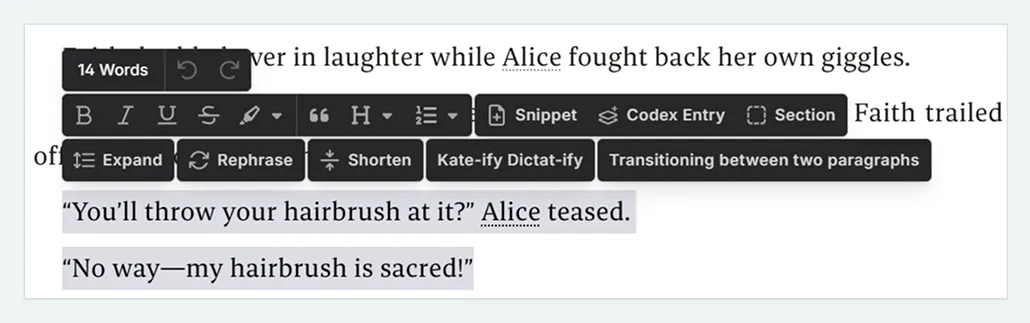
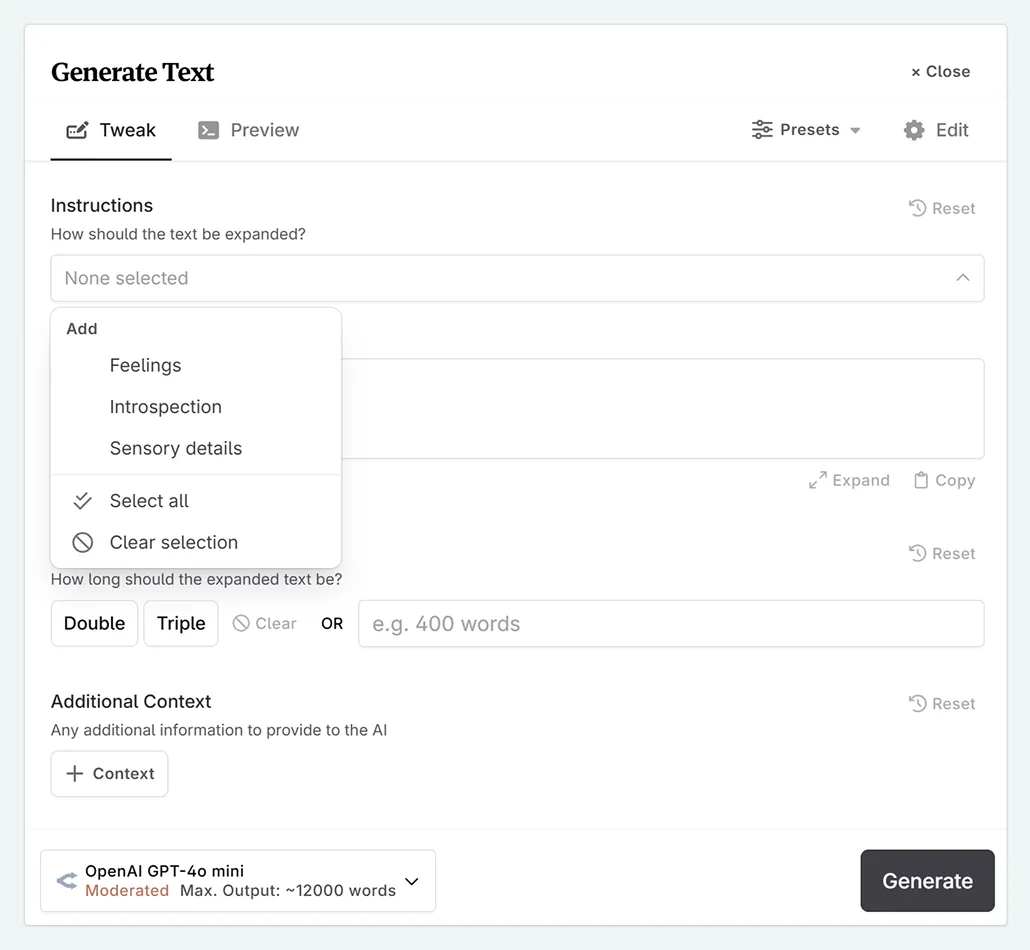
Novelcrafter is built for making your own revision tools. Select a passage and call Expand or Rephrase from the menu that opens; if none fits, make your own with Custom Prompts and add it to the same menu. Feedback on your writing comes from Workshop Chat.
With TypeTak, you pick the direction of a rewrite finely. Enhance has nine tools for choosing the direction, and Rephrase shows several rewritten options; pick one and it goes straight into the manuscript.
For the whole page, use the editor toolbar. Revision adds comments and alternatives to sentences that need fixing, and Proofreading marks spelling, grammar, and awkward phrasing on the page. Of the four, only TypeTak has spelling and grammar checks built in, though you can build a checking tool yourself with a Novelcrafter Custom Prompt or a Sudowrite plugin.
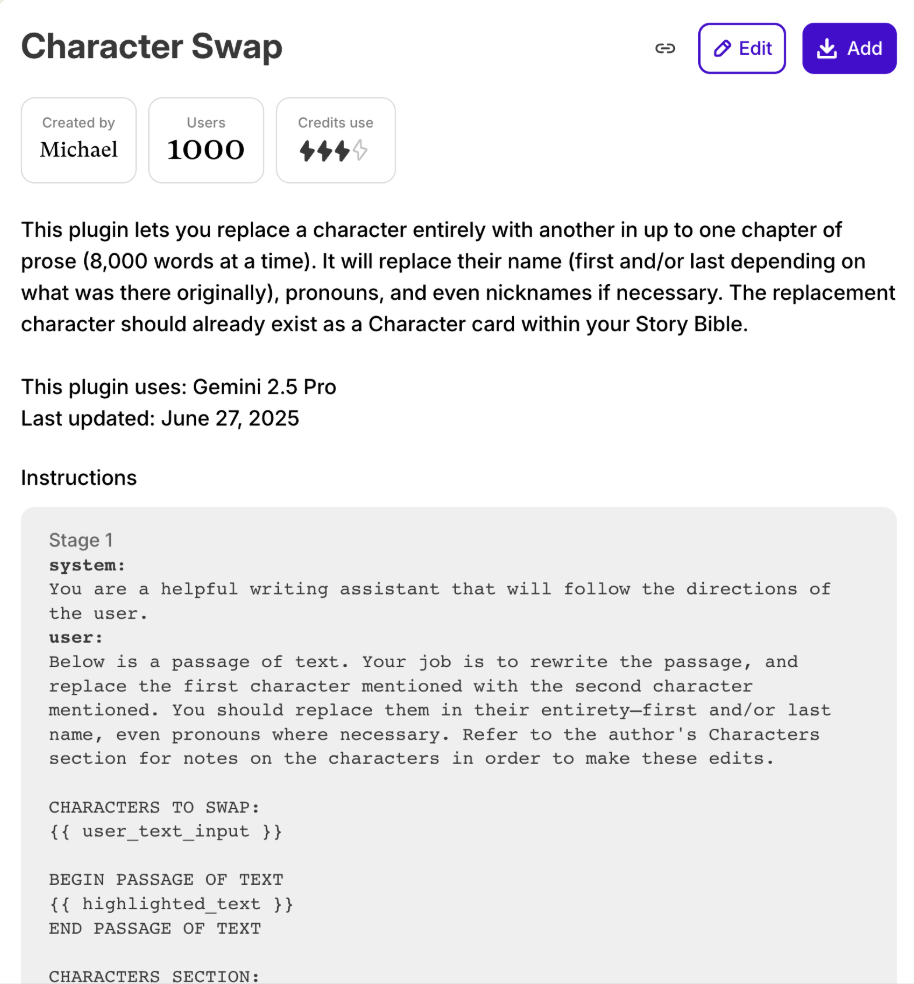
Sudowrite has you pick revision tools from more than 1,000 plugins made by other writers. Each plugin shows the instructions it sends to the AI, so you can adapt one into a tool of your own.
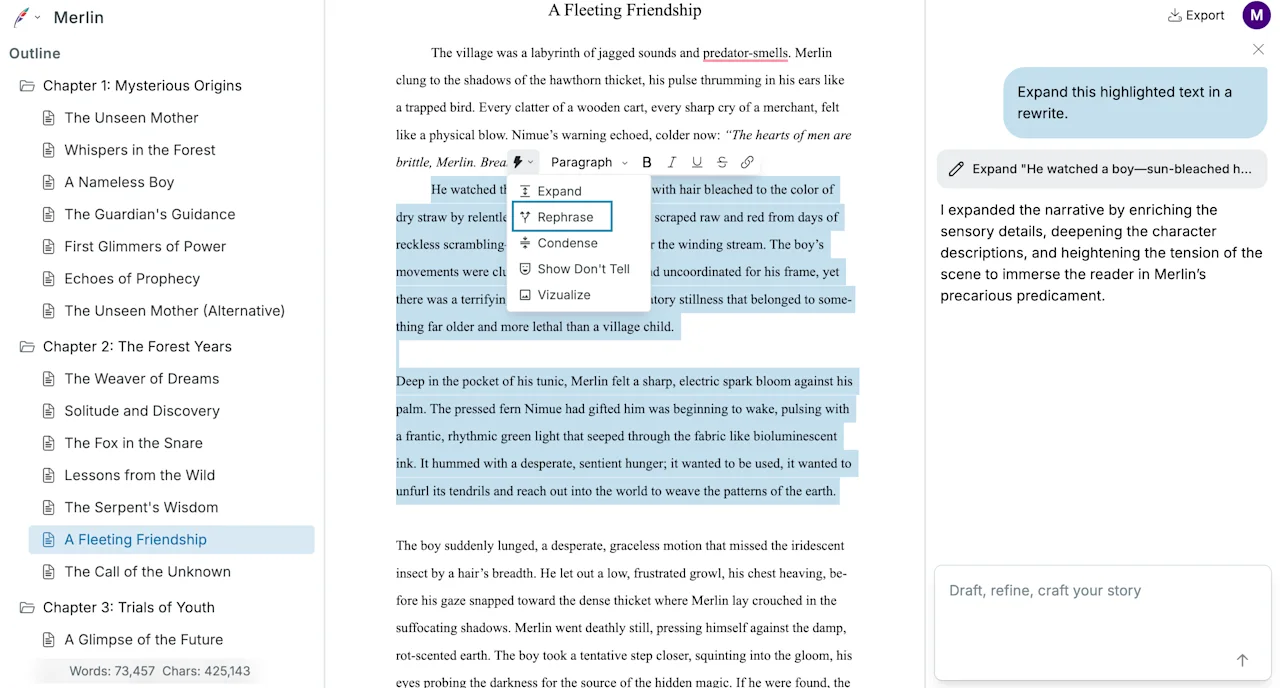
Squibler runs Expand, Rephrase, Condense, or Show Don't Tell on a selection; results arrive in the chat on the right, where you apply or discard each one. Review looks over the structure and content of the manuscript.
Pricing
| Item | Novelcrafter | TypeTak | Sudowrite | Squibler |
|---|---|---|---|---|
| Monthly price | $4 / $8 / $14 / $20 | $12 / $40 | $10 / $22 / $44 | $29.99 / $89.99 |
| Free trial | 21 days | 7 days | 1,000 credits | |
| Ongoing free plan | ||||
| AI usage | Your own AI key | Usage limit per plan | Credits per plan | Credits per plan (unlimited on Pro) |
Novelcrafter's subscription doesn't include AI costs. From the Hobbyist plan up, you connect a key from an AI provider and pay that provider separately. Connect a free model on OpenRouter, or a model running on your own computer through LM Studio, and you can use AI without paying for it. Workshop Chat starts on Artisan, and inviting others to collaborate starts on Specialist.
TypeTak, Sudowrite, and Squibler give each plan a set amount of AI use that goes down as you use it. On TypeTak you can add extra usage in units for a busy month and scale it back afterward, and there's a free plan that renews each cycle. Squibler's credits go down according to how much is read and written and which model does the work.
Novelcrafter — Scribe $4/month, Hobbyist $8/month, Artisan $14/month, Specialist $20/month (two months free billed yearly). TypeTak — Pro $12/month ($9/month billed yearly), Max $40/month ($29/month billed yearly). Sudowrite — Hobby & Student $10/month, Professional $22/month, Max $44/month (up to 50% off billed yearly). Squibler — Plus $29.99/month, Pro $89.99/month (up to 45% off billed yearly).
Which one fits you?
Novelcrafter fits writers who
- want to manage story beats systematically and track closely who appears in each scene
- want to pick their own model and run it with their own API key or on their own computer
- want control all the way down to the prompts sent to the AI
- want to invite an editor or co-author to work with them
TypeTak fits writers who
- want to use AI right away without setting up a key
- write serials where each chapter has to hit a set length
- want to work by talking through their world and upcoming plot in conversation
- want to build their worldbuilding in a modern editor and publish the graph and encyclopedia for others
Sudowrite fits writers who
- want several options for the next lines whenever they're stuck
- want to try a fiction-trained model instead of ChatGPT, Claude, or Gemini
- want a wide range of brainstorming tools and plugins shared by other writers
Squibler fits writers who
- want a book-length first draft from an idea in one go
FAQ
Can I move my Novelcrafter manuscript to TypeTak?
Save your chapters as .docx, .md, or .txt files and upload them with TypeTak's Import. Each file becomes one chapter, and the agent files the characters, places, and lore from those chapters into your World.
Which Novelcrafter alternatives work without an API key?
TypeTak, Sudowrite, and Squibler all include AI usage in the subscription, so no API key is needed.
Is there an alternative that runs local models like Novelcrafter?
TypeTak, Sudowrite, and Squibler don't support local models. If keeping your manuscript off other companies' servers matters most, Novelcrafter with a local model is the better fit.
Sources
- Novelcrafter: Pricing, Does Novelcrafter provide its own AI?, Using AI for free, Plan views, Codex entry anatomy, Codex details, Scene Beat, Generating prose with AI, Collaboration
- Sudowrite: Pricing, Features, Scenes & Draft, Characters, Worldbuilding, Books & Series, Muse
- Squibler: Pricing, Credits, Free trial, Generating a book, Elements, AI Chat Settings, Review, Outline (Organize), Expand
Share This Post
Change your first sentence with TypeTak today
Start TypeTakView More Content
→Find out how TypeTak is built, how to use it, and what helps you write.